
CyberPower ST625U Standby UPS Battery Backup and Surge Protector
4.5Editor score
625VA/360W Standby Output
8 NEMA 5-15R Outlets
GreenPower High Efficiency Design
This guide compares ten top Cyberpower UPS battery backup models to help you choose the right power protection for your home office or business equipment needs.
Power outages and surges can devastate your critical electronics without warning. A reliable UPS ensures your workstations stay online and your data remains safe during unexpected interruptions.
We evaluated ten leading Cyberpower models based on output capacity, waveform type, outlet count, and user feedback. Each unit offers distinct advantages for specific setups and power needs.
Each review highlights key specifications, pros, cons, and ideal use cases. Prices fluctuate frequently, so verify current availability and deals before making your final purchase decision.
4.5Editor score

4.5Editor score

4.6Editor score
The following table provides a side-by-side comparison of all ten Cyberpower UPS models. Review the output capacity, outlet count, and key features to find the best match for your setup.




The CP1500PFCLCD stands out as a top tier option for protecting modern computing equipment. Its pure sinewave output ensures compatibility with active PFC power supplies that struggle with simulated waveforms. Users report stable performance during brownouts and clear LCD displays that simplify monitoring power conditions. This model earns its editor's choice badge by balancing robust power capacity with essential smart features.
We may earn a commission when you buy through this link, at no additional cost to you.
A key strength lies in its 1500VA capacity paired with pure sine wave technology. This combination supports servers, gaming rigs, and workstations that require clean power. The 12 outlets provide ample space for desktop PCs, monitors, and networking gear. Two USB ports allow quick charging of mobile devices. Automatic voltage regulation handles minor fluctuations without draining the battery.
However, the unit is notably heavier and pricier than basic standby models. Installation might require two people due to its weight. While the extra cost is justified for critical setups, casual users may find simpler units sufficient. The battery replacement is manageable but requires following safety protocols to ensure long-term reliability.
This UPS is ideal for tech enthusiasts and professionals needing reliable power for high-end systems. If your equipment includes active PFC power supplies, the pure sine wave output is non-negotiable. The comprehensive warranty and connected equipment guarantee add further peace of mind for protecting valuable hardware investments.
Pure sine wave output ensures safe operation for active PFC power supplies found in modern PCs and servers.
With twelve outlets total, this unit supports multiple devices without needing additional surge strips.
We may earn a commission when you buy through this link, at no additional cost to you.
The EC850LCD introduces a unique ECO Mode feature that reduces power consumption when connected devices are idle. This efficiency focus makes it appealing for cost conscious users seeking basic protection. The LCD panel offers clear status updates without requiring software. While not the most powerful, it balances energy savings with essential surge protection capabilities.
We may earn a commission when you buy through this link, at no additional cost to you.
ECO Mode intelligently shuts off power to peripherals when the main computer sleeps. This feature significantly lowers ongoing electricity costs over time. With twelve outlets including six backup protected ones, there is room for monitors, routers, and speakers. The LCD shows battery life and load levels clearly. It remains lightweight compared to higher capacity models.
The main trade-off is the lower 850VA capacity and simulated sine wave. This limits suitability for servers or gaming PCs demanding high wattage. It excels in home offices with standard PCs. Users needing long runtimes should consider larger units. Overall, it delivers reliable value for energy conscious households.
This UPS suits home office setups prioritizing energy efficiency. The ECO Mode makes a real difference for users running long hours daily. If your load is under 850VA and you want to minimize power waste, this model delivers strong performance without compromising on basic protection needs or usability.
ECO Mode automatically cuts power to peripherals when the computer sleeps, reducing energy waste.
The multifunction LCD provides instant visual feedback on battery and power conditions.
We may earn a commission when you buy through this link, at no additional cost to you.
The CP1500AVRLCD3 offers a compelling blend of capacity and user-friendly design. Its color LCD panel stands out in this price range, offering detailed real-time data. The 1500VA capacity handles most home office needs comfortably. USB ports add convenience for charging phones. It represents a solid middle ground for users seeking visible status indicators.
We may earn a commission when you buy through this link, at no additional cost to you.
The color display alerts users to issues before they affect critical equipment, reducing downtime risks. With six backup outlets and six surge only outlets, it supports a full workstation setup. The simulated sine wave is adequate for most consumer electronics. Automatic voltage regulation protects against fluctuations without using battery power. The unit feels sturdy during installation.
Despite its strengths, it lacks pure sine wave output, which limits server compatibility. Some users report the color screen can be hard to read in bright rooms. However, the detailed info helps optimize battery usage. For general computing needs, the trade-offs are acceptable given the affordable pricing point.
This model fits general home office users needing visibility into power status. If you value a color screen and USB charging alongside 1500VA capacity, this unit delivers. It provides sufficient power for desktops and peripherals while keeping costs reasonable compared to premium server-grade alternatives.
The color LCD panel shows detailed power conditions and alerts users to potential issues.
Six backup outlets paired with six surge outlets offer versatile device connectivity.
We may earn a commission when you buy through this link, at no additional cost to you.
The AVRG900LCD adds valuable protection against line noise on telephone and data lines. This feature protects modems and networking gear from surges that bypass standard electrical outlets. The 900VA rating suits smaller setups. It includes standard AVR for voltage stability. Users appreciate the extra layer of security for internet connections.
We may earn a commission when you buy through this link, at no additional cost to you.
Data line protection prevents surges traveling through phone lines from damaging connected electronics. This is critical for areas prone to storms or unstable infrastructure. The 12 outlets accommodate desktop PCs, routers, and monitors. The LCD panel displays battery capacity and runtime. It runs quietly without disturbing home offices.
While its wattage limits heavy-duty use, the specialized protection justifies its niche. It may not fit larger setups requiring 1500VA. The design prioritizes compactness over capacity. For home offices with sensitive networking gear, the added protection is a significant benefit worth considering over basic models.
This UPS is best for users needing protection beyond electrical outlets. If your modem or router requires safeguarding from line surges, this model delivers. It offers balanced power for standard setups while ensuring your internet infrastructure remains secure during electrical disturbances.
Data line protection shields modems and routers from surges traveling via telephone lines.
Automatic Voltage Regulation keeps power stable without unnecessarily draining battery reserves.
We may earn a commission when you buy through this link, at no additional cost to you.
The ST625U offers accessible entry into UPS protection at a minimal cost. Its 625VA rating covers small devices and basic PCs. USB ports add convenience. GreenPower technology reduces energy consumption. LED indicators simplify status checks. It is a practical choice for users prioritizing affordability over extended runtime.
We may earn a commission when you buy through this link, at no additional cost to you.
This unit is designed for essential devices like routers, small PCs, or consoles. Eight outlets provide flexibility for basic setups. Two USB ports allow device charging. The efficiency design keeps operating costs low. It switches quickly to battery during outages. Installation is straightforward for beginners.
Runtime is limited compared to larger models. It may not support gaming PCs or heavy workstations. The design favors portability and low cost. For simple needs like protecting a modem, it works well. Users should ensure their total load stays within the 360W limit to avoid overloads.
This model is ideal for small home setups on tight budgets. If you need basic protection for a laptop and modem, it delivers. The low cost and simple features make it a sensible starter UPS for those new to power backup technology.
This unit offers essential power backup at an entry-level price point for cost-conscious buyers.
GreenPower technology reduces overall energy consumption during regular operation.
We may earn a commission when you buy through this link, at no additional cost to you.
The PR1500LCD delivers enterprise-grade features suitable for business servers and critical infrastructure. Its 1500W output provides high capacity. Sinewave output ensures equipment compatibility. The extendable LCD panel aids installation in tight spaces. Optional remote management cards enable advanced monitoring for network administrators.
We may earn a commission when you buy through this link, at no additional cost to you.
Designed for professional environments, it offers robust voltage regulation and ample wattage. The extendable LCD panel is unique, allowing remote status checks from hard-to-reach locations. It includes eight outlets with full backup protection. The power output matches high-end workstation needs. This unit excels in reliability and advanced configuration options.
The price point reflects its premium positioning. It has fewer outlets than consumer models, prioritizing power quality. Installing management cards requires technical know-how. For home users, it might be overkill unless running servers. The investment is justified by uptime reliability and enterprise-grade control features.
This UPS is best for server rooms and professional IT setups. If you manage critical infrastructure or need remote management, it is unmatched. The high wattage and sine wave output ensure top-tier protection for demanding applications requiring consistent power quality.
Optional management cards enable remote monitoring for enterprise deployments.
The LCD panel can be moved for easier viewing in rack-mounted setups.
We may earn a commission when you buy through this link, at no additional cost to you.
The CP1500AVRLCD focuses on core reliability without extra frills. It features 1500VA capacity and AVR for voltage stability. The LCD panel tracks runtime and load. Twelve outlets support full workstations. It is a dependable choice for standard home office needs. The unit ensures consistent power quality for sensitive electronics.
We may earn a commission when you buy through this link, at no additional cost to you.
Automatic Voltage Regulation stabilizes input without switching to battery for minor fluctuations. This extends battery life. The LCD provides clear status updates on battery health. Its 12 outlets handle multiple devices comfortably. The sturdy build ensures durability in daily use. It balances performance and practicality well.
It lacks USB ports found in newer models, which is a downside for mobile charging. The design is traditional with heavy components. While not flashy, it delivers essential protection reliably. For users wanting a no-nonsense backup, it remains a top contender among standard units.
This model suits users seeking dependable protection without extra features. If you prioritize capacity and outlet count over USB charging, it fits. The AVR ensures your PC receives stable power, reducing risks from voltage fluctuations in older electrical circuits.
Automatic Voltage Regulation protects against brownouts without unnecessary battery use.
The LCD provides immediate status updates on battery health and load.
We may earn a commission when you buy through this link, at no additional cost to you.
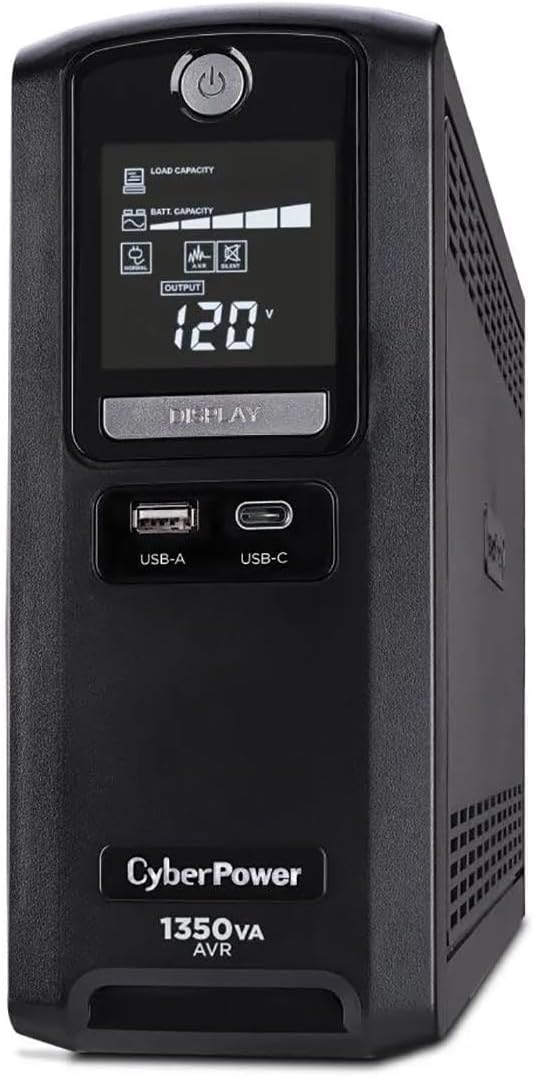
The CST135UC stands out with Energy Star certification, reducing environmental impact. It combines 1350VA power with network and coax protection for comprehensive coverage. The 10 outlets support versatile setups. Users rate it highly for performance and eco-friendly design. The LCD interface provides clear operational data for monitoring power status.
We may earn a commission when you buy through this link, at no additional cost to you.
Energy Star certification ensures lower power consumption during standby and active use. Network and coax protection shield internet connections from surges. The unit provides ample runtime for safe shutdowns. The LCD shows load and capacity metrics. It balances efficiency with robust protection for home networks.
While the simulated waveform suits most devices, it is not for PFC power supplies. The outlet count is lower than 12-outlet models but sufficient for most. Users praise its sleek design and performance reliability. The high rating reflects strong customer satisfaction with its balanced feature set.
This UPS is ideal for eco-conscious users needing network protection. If you want to minimize energy use while protecting internet gear, it fits. The combination of efficiency ratings and coax protection makes it a smart choice for connected home offices.
Energy Star certification ensures efficient operation and reduced energy waste.
Network and coax ports prevent line surges from damaging routers and modems.
We may earn a commission when you buy through this link, at no additional cost to you.
The BRG1500AVRLCD2 offers a five-year warranty, exceeding standard three-year terms. This extended coverage reflects strong build quality. It includes 1500VA capacity and color LCD. The 12 outlets provide full workstation support. Users value the long-term security and reliable performance. It is a smart choice for risk-averse buyers.
We may earn a commission when you buy through this link, at no additional cost to you.
The warranty covers the battery, which is often an added cost. AVR protects against fluctuations. The color display warns of issues proactively. Remote management cards can be added later. This flexibility makes it adaptable. The unit handles significant loads while keeping status visible.
It is heavy and requires two people for placement. The waveform is simulated, not pure. Despite this, it serves most users well. The warranty justifies the investment for long-term use. It combines solid specs with exceptional support terms.
This UPS suits users prioritizing long-term coverage. If you want protection for years without extra battery costs, it fits. The 1500VA power and warranty make it a durable, dependable option for critical home office needs requiring extended support.
A five-year warranty covers the battery and connected equipment for extended protection.
Color LCD alerts users to potential issues before they cause downtime.
We may earn a commission when you buy through this link, at no additional cost to you.
The OR1500LCDRT2U supports both tower and rack installation. This versatility suits home servers or networking closets. It includes 1500VA capacity and LCD monitoring. Remote management cards enable enterprise-level control. Users appreciate the space-saving design. It delivers solid performance in compact environments.
We may earn a commission when you buy through this link, at no additional cost to you.
Rack mounting saves floor space and organizes server setups efficiently. The LCD displays runtime and battery status. AVR protects against fluctuations. It supports up to 900W continuous load. The build feels sturdy for professional setups. It is a niche choice for dedicated server users.
Not all users need rack mounts. For desktops, tower mode works but takes more space. The price reflects its specialized nature. If you have a rack, it is highly effective. Otherwise, a tower model may be more practical.
This UPS is best for rack-mounted server setups. If you run a network closet or home server rack, it fits perfectly. The versatility allows flexibility in placement. Ensure your setup supports rack mounting to take full advantage.
Supports both tower and rack mounting for flexible space-saving installation options.
Optional remote management cards provide advanced control and alerting capabilities.
We may earn a commission when you buy through this link, at no additional cost to you.
Selecting the right UPS requires matching capacity and features to your equipment. This guide walks through the key factors to consider before purchase.
Output capacity measures the maximum load a UPS can support during a power outage. VA (Volt-Amps) and Watts indicate how much equipment the battery can handle. Always calculate your total device wattage and select a UPS with at least 20% extra capacity for safety.
Match VA and Watt ratings to your device load to prevent overload during critical times.
Pure sine wave output provides clean power identical to grid supply, essential for modern active PFC power supplies. Simulated sine wave is cheaper but may cause noise or instability in sensitive equipment. Check your power supply specs before choosing between waveform types.
Use pure sine wave for servers and modern PCs; simulated is acceptable for basic electronics.
Most Cyberpower models offer split outlets: some for battery backup and surge protection, others for surge only. Ensure you have enough backup outlets for critical devices like PCs and routers. Additional surge-only outlets protect non-critical gear like printers or speakers.
Count backup outlets needed for essentials and verify total outlets match your setup.
Automatic Voltage Regulation (AVR) corrects minor brownouts or overvoltage without draining the battery. This feature extends battery life and provides continuous protection during unstable power conditions. Look for AVR in models intended for areas with frequent power fluctuations.
AVR protects your battery from wear by handling minor voltage changes independently.
USB ports on the UPS allow charging mobile devices during outages. Some models include data line protection for phone or coax cables to shield network gear. Advanced units offer USB communication for software monitoring or optional remote management cards.
Choose units with USB charging or data protection based on your specific connectivity needs.
Warranty terms vary by model, with some offering extended coverage including the battery. The Connected Equipment Guarantee covers damages to devices plugged into the UPS due to power surges. Review warranty length and coverage details to understand long-term investment protection.
Look for warranties covering battery and connected equipment for maximum peace of mind.
UPS units come in tower or rack-mountable formats. Rack-mount models save floor space in server closets. Consider available space and ventilation when selecting a unit. Larger capacities often mean heavier weights requiring two-person installation.
Measure space and choose tower or rack-mount options that fit your room setup.
Some models support PowerPanel software for battery monitoring, automatic shutdown, and alerts. Advanced units require optional management cards for remote control. This software is vital for unattended setups to prevent data loss during unexpected power failures.
Ensure software compatibility and management features align with your monitoring preferences.
Plug the UPS into a grounded wall outlet and connect critical devices to battery backup outlets. Do not plug high-wattage appliances like heaters or microwaves into the UPS. This prevents overloading and ensures the battery is available when needed.
Install the manufacturer software to monitor battery status and configure automatic shutdowns. Run a test by unplugging the unit during normal operation to confirm switching. This verifies that your equipment will remain powered during real outages.
Store the UPS in a cool, dry place to preserve battery health. Replace the battery every three to five years or when runtime drops significantly. Proper maintenance ensures reliable performance when you need it most during emergencies.
Runtime depends on the load connected to the unit. A 1500VA UPS can support a PC and monitor for 15–30 minutes at half load. At full load, runtime drops significantly. Always check the estimated runtime chart provided by the manufacturer for accurate expectations based on your gear.
Yes, but choose a model with pure sine wave output and sufficient wattage to handle high-performance power supplies. Look for 1500VA or higher capacity. Gaming PCs often draw significant power during intensive sessions, so matching capacity requirements is essential to avoid overloads.
The initial battery is included, but replacement is sold separately. Models with three to five-year warranties may cover the battery during that period. Check specific model details to see if the warranty extends to the battery and how to access replacement parts.
Backup outlets provide power from the battery during outages, while surge outlets only protect against spikes without backup power. Critical devices like computers need backup outlets. Peripherals like printers or speakers can use surge-only outlets to conserve battery capacity.
Test your UPS at least once every three months. Unplug it briefly to ensure devices switch to battery power without issue. Regular testing confirms that the battery is functional and prevents surprises during actual power outages.
AVR is valuable if you live in areas with unstable power grids. It corrects minor fluctuations without draining the battery, extending overall lifespan. For regions with stable power, it may be optional but remains a useful protective feature for sensitive electronics.
Cyberpower offers a diverse lineup of UPS models ranging from budget-friendly standby units to premium server-grade protection. Whether you need pure sine wave for workstations or energy-efficient ECO modes, there is a model to match every requirement.
Prioritize capacity and waveform based on your equipment's power supply needs. Consider outlets, warranty terms, and optional software features. Balancing these factors ensures you invest in a unit that safeguards your gear effectively.
Prices and availability change frequently. Verify current stock and deals before purchasing to ensure you get the best value for your investment in reliable power protection.