
Mitoart Digital Alarm Clock
4.7Editor score
Voice announcement time function
7 inch large digital display screen
Automatic dimming option included
This guide compares the top digital clocks with date and day of week features to help seniors and families choose the best large display alarm clock for daily
Finding a clear and reliable timepiece is essential for maintaining daily routines, especially for seniors or those managing memory challenges. A good digital clock with date and day of week provides visual clarity and reduces confusion by displaying full dates without abbreviations. This ensures users can quickly orient themselves to the current day and time with ease.
We evaluated ten leading models based on display size, readability, alarm flexibility, and ease of setup. Our comparison focuses on features like auto dimming, voice announcements, and battery backup to ensure consistent performance. Each product was assessed for its ability to support independent living through intuitive design and robust functionality.
Each pick below highlights specific strengths such as voice timing, customizable reminders, or multi-language support to suit diverse needs. Prices and availability are subject to change, so verify current details before purchasing. Use this guide to find the perfect clock that combines accuracy with user-friendly design for your home.
4.7Editor score

4.6Editor score

4.6Editor score
The following table provides a side-by-side comparison of all ten selected models. It highlights key specifications such as display size, alarm capabilities, and special features to help you make an informed decision based on your specific requirements.


The SSYA Dementia Clock stands out as a top-tier solution for those needing clear time and date information. With a rating of 4.6, it delivers an Ultra-Large 11.5-inch screen that spells out full dates and times without abbreviations. This design specifically targets seniors and individuals with memory loss who need maximum clarity.
We may earn a commission when you buy through this link, at no additional cost to you.
Its standout quality is the ability to divide the day into five cycles like Morning and Afternoon, accompanied by Sun and Moon icons. The clock supports multiple languages and offers 12 customizable alarms for tasks like medication reminders. This ensures that users stay on schedule without confusion.
While the price is higher than basic models, the investment pays off in reduced confusion and better routine management. The auto dimming feature ensures comfort at night. The only trade-off is the reliance on a power cord, which limits placement options compared to battery-only clocks.
This clock is ideal for caregivers seeking a reliable tool to support independent living. The combination of large text, visual cues, and robust features makes it a top recommendation for those with visual or cognitive challenges.
The large non-abbreviated text ensures users can read the time from a distance without squinting or confusion.
Customizable alarms and cycle divisions help maintain daily schedules and reduce the cognitive load of tracking time.
We may earn a commission when you buy through this link, at no additional cost to you.
The Mitoart Digital Alarm Clock offers a budget-friendly yet effective solution for seniors and those with memory challenges. With a rating of 4.7, it provides a 7-inch display with clear bold letters for the week, month, and date. Its voice announcement function allows users to hear the time with a simple button press.
We may earn a commission when you buy through this link, at no additional cost to you.
Key strengths include the automatic dimming option which adjusts brightness based on the time of day. The interface is designed for simplicity, ensuring elderly users can navigate it easily. This accessibility makes it a practical gift for those needing routine support without complex tech.
The main trade-off is the smaller screen size compared to premium models which may be less visible from afar. However, for bedside tables or close viewing, the clarity is sufficient. The price point makes it an accessible entry option for caregivers on a budget.
This model is best suited for users who prioritize ease of use and affordability over advanced features. The voice timing and dimming functions provide necessary comfort and functionality for daily time management.
Users can hear the time spoken clearly which helps those with poor vision confirm the current time without reading.
The intuitive setup ensures that elderly individuals can start using the clock immediately without frustration.
We may earn a commission when you buy through this link, at no additional cost to you.
The American Lifetime Dementia Clock combines quality materials with thoughtful design to support daily routines. Rated 4.6, it features a large clear display that spells out the full day of the week, month, and date. The packaging intentionally excludes terms like dementia to reduce stigma while delivering essential tools.
We may earn a commission when you buy through this link, at no additional cost to you.
Its primary strength lies in the customizable alarms and multi-language support making it versatile for different households. The compact size and high contrast display ensure readability even in low light. Users also benefit from a one-year warranty and direct US-based customer service for peace of mind.
While the price is on the higher side, the durability and support justify the investment. The display is slightly smaller than some ultra-large models but remains highly readable. This balance makes it a premium choice for those valuing support and design.
This clock is ideal for households seeking a reliable and respectful tool for elderly care. The combination of practical features and professional support makes it a strong contender for those prioritizing quality.
By excluding sensitive terms from packaging the clock provides essential help without labeling the user.
US-based support and a one-year warranty ensure that any issues are resolved quickly and effectively.
We may earn a commission when you buy through this link, at no additional cost to you.
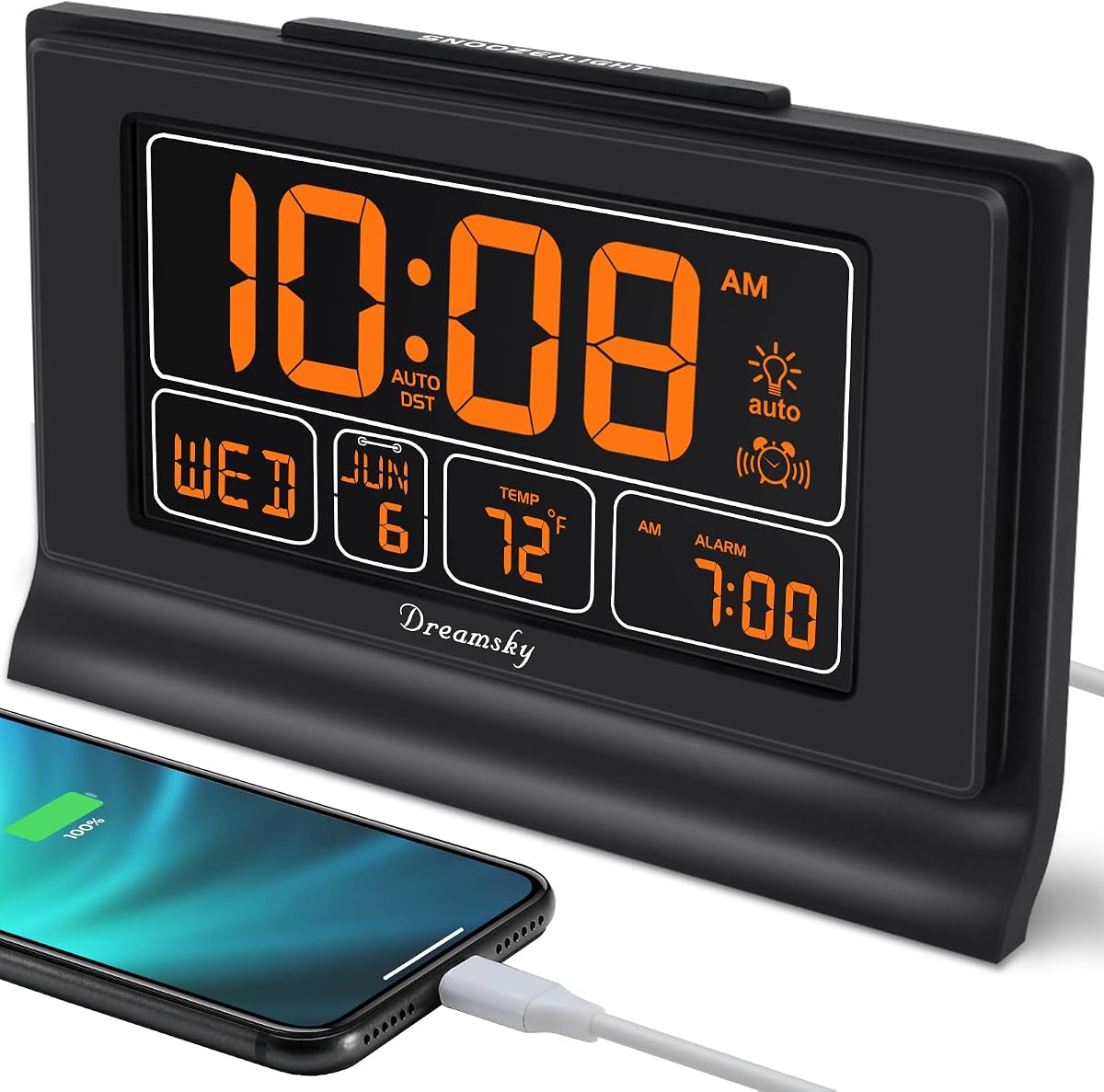
The DreamSky Large Digital Clock offers a practical set of features centered on comfort and convenience. With a rating of 4.6, it displays time, date, day of week, and indoor temperature on a 7.6-inch screen. This multi-function display helps users stay informed without needing separate devices.
We may earn a commission when you buy through this link, at no additional cost to you.
Key strengths include the auto dimmer which adjusts brightness automatically at set times. The USB charging port adds utility by allowing device charging from the bedside. Additionally, the battery backup ensures the time is not lost during power outages.
The trade-off is the slightly smaller screen compared to the ultra-large options. However, the added temperature display provides unique value. The 4 level volume control ensures the alarm is audible without being too disruptive.
This model is ideal for users wanting a functional bedside clock with extra utility. The combination of temp monitoring and charging makes it a versatile addition to any bedroom.
The indoor temperature display helps users quickly check room conditions without searching for a thermometer.
Battery backup ensures the clock retains settings and time during unexpected power outages.
We may earn a commission when you buy through this link, at no additional cost to you.
This digital clock with date and week offers extensive customization through its 20 alarms and reminder slots. Rated 4.4, it features a 7-inch HD screen that divides the day into distinct periods with visual icons. The support for multiple themes and colors allows users to match their decor.
We may earn a commission when you buy through this link, at no additional cost to you.
Standout features include the ability to play photos via SD or USB drive and clear colorful alarm icons. This visual and auditory support helps prevent missed tasks and adds a personal touch to the device. The sun and moon icons provide additional context for the time of day.
The main drawback is the complexity of setup which may require assistance for some users. The SD card slot is a great addition but the card must be purchased separately. Overall the features provide robust support for routine management.
This clock is best for tech-savvy households wanting personalization. The alarm variety and photo playback make it a unique tool for memory and routine support.
With 20 alarms users can set specific reminders for medication tasks daily activities and events.
Display themes and photo playback allow users to customize the clock to their preferences and memory cues.
We may earn a commission when you buy through this link, at no additional cost to you.
The Nimukol Digital Alarm Clock is a strong option for those needing voice confirmation of the time. With a rating of 4.7, it features a 7-inch display and voice timing supported by 9 languages. This makes it accessible for users with different linguistic backgrounds.
We may earn a commission when you buy through this link, at no additional cost to you.
Key strengths include the automatic dimming and multiple alarm capabilities. The interface is designed for simplicity which helps elderly users navigate it easily. The large font ensures the date and time are readable from a distance.
The trade-off is the lack of additional ports like USB for charging. The design is functional but basic compared to more decorative models. However, the core features deliver on their promise of reliable timekeeping.
This clock is ideal for users prioritizing voice feedback and ease of use. The support for multiple languages makes it a great choice for diverse households.
Support for 9 languages ensures non-native speakers can use the time announcements and setup easily.
The simple interface and automatic features reduce the need for complex manual adjustments.
We may earn a commission when you buy through this link, at no additional cost to you.
The DIWAKREM 7 Large Display Clock uses an IPS screen to deliver a wide 175-degree viewing angle. Rated 4.5, it ensures the display does not distort or fade from different directions. This feature is valuable for those viewing the clock from across the room.
We may earn a commission when you buy through this link, at no additional cost to you.
Its standout feature is the time memory function which updates to the current time after a power failure. This prevents the need for manual resets. The use of cartoon pictures for reminders adds a gentle and clear way to display tasks.
The main trade-off is that it is not battery operated and relies on a power cord. This limits placement but ensures consistent power. The auto dimming feature protects eyes during the night.
This clock is ideal for users who need a clear wide-angle view. The visual reminders and memory function make it a robust tool for memory support.
The IPS screen ensures the text is clear from almost any angle without distortion.
Cartoon pictures help remind users of tasks in a friendly and easy to understand way.
We may earn a commission when you buy through this link, at no additional cost to you.
The KOSUMOSU Digital Alarm Clock offers a modern aesthetic with a sleek mirror clock style. Rated 4.1, it features a 6.7-inch LED display with white and sky blue digits. This design suits contemporary bedrooms or living rooms where style matters.
We may earn a commission when you buy through this link, at no additional cost to you.
Key strengths include the dual alarm support and temperature display. The auto manual dimming allows for flexible brightness control. The compact size makes it easy to fit on small nightstands without clutter.
The trade-off is the lack of voice features and smaller display area which may be less readable for those with vision issues. The design is prioritized over maximum visibility. It remains a solid choice for general use.
This clock is ideal for users who want a stylish accessory with standard features. The dual alarms and temperature display offer practical value for daily routines.
The mirror clock style provides a sleek look that complements modern decor styles.
Dual alarms and temperature display provide essential functionality in a compact package.
We may earn a commission when you buy through this link, at no additional cost to you.
The Peakeep Large Display Alarm Clock provides an oversized screen for easy reading from a distance. Rated 4.6, it features a reliable power cord connection and automatic DST adjustment. This ensures accurate timekeeping without manual intervention.
We may earn a commission when you buy through this link, at no additional cost to you.
Key strengths include the USB charging port and 5 volume settings. These features allow for flexible use of the bedside space and alarm volume control. The adjustable brightness ensures comfort during the night.
The main trade-off is the lack of battery backup which means settings may reset during a power outage. However, the plug-in design ensures consistent power otherwise. The interface is straightforward and easy to navigate.
This clock is ideal for users wanting a reliable and visible bedside option. The USB port and automatic features add value for daily convenience.
The USB port allows users to charge phones without needing extra outlets on the nightstand.
Automatic DST updates ensure the clock remains accurate throughout the year without manual adjustments.
We may earn a commission when you buy through this link, at no additional cost to you.
The DreamSky Alarm Clocks with Backup feature an auto set capability that simplifies initial setup. Rated 4.6, it adjusts to the correct time, date, and temperature once plugged in. The ascending beeping alarm gently wakes users without startling noise.
We may earn a commission when you buy through this link, at no additional cost to you.
Its primary strength is the battery backup which ensures accuracy during power outages. The USB charging port adds convenience for device charging. The auto DST feature further reduces the need for manual adjustments.
The trade-off is the smaller 5-inch screen compared to larger models. Users must also set the correct time zone. Despite this, the ease of use and backup features are highly practical.
This clock is best for users seeking a low-maintenance and reliable alarm. The auto set and battery backup provide peace of mind for consistent timekeeping.
The auto set function ensures the clock is ready to use with minimal initial input.
The ascending alarm sound wakes users gradually which promotes a calmer morning start.
We may earn a commission when you buy through this link, at no additional cost to you.
Choosing the right clock requires attention to display clarity, alarm flexibility, and ease of use. The following factors help you prioritize features that suit your specific needs and living environment.
Display size is the most critical factor for readability. Larger screens reduce eye strain and allow reading from a distance. Look for models that spell out the full day of the week and date without abbreviations to avoid confusion.
Prioritize clocks with screens at least 7 inches or larger for maximum clarity. High contrast text ensures visibility in low light.
The number of alarms and the ability to customize them determine how well the clock supports your routine. Models with multiple alarms allow you to set reminders for medication, appointments, or daily tasks. Visual cues like icons or color changes enhance understanding.
Select a clock with at least 10 customizable alarms if you need multiple reminders. Visual icons add clarity beyond sound alerts.
Voice announcements allow users to hear the time with a button press. This is helpful for those with vision impairments or who prefer auditory cues. Check if the clock supports multiple languages if needed.
Opt for a model with voice timing if visual reading is challenging. Ensure the volume is adjustable to suit hearing preferences.
Auto dimming adjusts brightness based on the time of day to prevent disruption during sleep. Manual control allows you to set the perfect level for night or day. Look for soft light without blue light to protect eyes.
Prioritize automatic dimming for convenience. Ensure the brightness range includes low levels for nighttime visibility.
Most models require a wall outlet but battery backup ensures settings are saved during outages. Without backup, you may have to reset the time after a power cut. This is crucial for reliability.
Check if the clock includes a battery backup. If not, ensure you can access a stable power source near the clock.
Simple interfaces with clear buttons and menus reduce frustration. Avoid models with complex menus or too many steps. A clock should be intuitive for all users regardless of technical skill.
Look for one-click setup and straightforward button labeling. A simple interface ensures the clock is used effectively.
Features like USB charging ports, temperature displays, or photo playback add utility to the clock. These can reduce clutter by combining devices. However, ensure these do not complicate the core timekeeping function.
Evaluate which extra features align with your needs. USB charging and temperature displays offer practical value for bedside use.
High-quality materials ensure the clock withstands daily handling. A warranty provides protection against defects and ensures support. Look for models backed by reputable brands with clear service terms.
Choose a clock with a solid warranty and quality build. Support availability is key for long-term reliability.
Begin by plugging the clock into a power source and setting the initial time and date. Follow the manual to choose the correct time zone and format. Ensure the date and day of week are displayed correctly before use.
Adjust the brightness and dimming settings to suit your environment. Set alarms and reminders by following the menu prompts. Test the volume and alarm sounds to ensure they are audible without being too loud.
Clean the display with a soft dry cloth to maintain clarity. Avoid using harsh chemicals that may damage the screen. Regularly check the clock for power consistency and replace backup batteries as needed.
A display size of 7 inches or larger is recommended for seniors. This ensures the text is large enough to read without glasses. Models that show full dates without abbreviations are even better for clarity.
Many models include a battery backup that stores settings during power outages. Without backup, the clock will reset when power is restored. Always check if the model you choose includes backup battery support.
Most clocks in this category support multiple alarms. Some models allow up to 20 alarms and reminders. This flexibility helps users manage complex schedules with different times for different tasks.
Most clocks have auto dimming or manual brightness controls. Auto dimming adjusts automatically based on the time of day. Manual control allows you to set specific levels using buttons on the clock.
Some models include a voice announcement feature that speaks the time when a button is pressed. This is helpful for those with vision impairments. Check the product features to confirm if this function is included.
Several clocks offer multi-language support including English, French, German, and others. This makes them accessible for households with different language preferences. Verify the supported languages before purchasing.
Most digital clocks in this category require a wall outlet for continuous power. Some models have battery backup but not for operation. If you need a battery-only clock, check for specific battery-operated models.
Clean the clock weekly to maintain display clarity and hygiene. Use a soft dry cloth to wipe the screen and buttons. Avoid liquids or harsh chemicals that could damage the device.
The ten models reviewed offer a range of features to meet different needs from basic timekeeping to advanced memory support. The SSYA Dementia Clock provides the clearest display while the Mitoart offers excellent value for budget buyers. Each model brings unique strengths to help users stay organized.
Prioritize display size, alarm customization, and ease of use when selecting a clock. Features like voice announcements and auto dimming add significant value for those with vision challenges. Ensure the model fits your power requirements and placement options.
Prices and availability change frequently so check the latest details before purchasing. Use the comparison table to verify specs and select the best fit. Investing in the right clock supports routine and peace of mind.