
HUION Artist Drawing Glove
4.5Editor score
Soft Lycra and Nylon material
Universal one-size fit
Stain-resistant black color
This guide compares the top digital drawing glove options for artists using tablets and screens to prevent smudges and improve stroke precision.
Digital drawing gloves are essential tools for artists working on tablets and touchscreens. They prevent smudges, reduce friction, and protect your device from oils and sweat during long creative sessions.
We compared ten top-rated models based on fit, material quality, breathability, and compatibility with various devices. Our analysis covers options for both left and right-handed users across different budget ranges.
Each pick highlights key features, pros, and cons to help you choose the right glove for your workflow. Please note that product availability and pricing may change over time.
4.5Editor score

4.6Editor score
4.4Editor score
This side-by-side comparison highlights the key specifications and features of all ten digital drawing gloves evaluated in this guide to help you make an informed decision.


This drawing glove stands out with its 3-layer anti-smudge design that effectively prevents palm touches on screens. It holds a strong 4.6 rating from users who appreciate its comfort and precision enhancement.
We may earn a commission when you buy through this link, at no additional cost to you.
The two-finger design adapts to both left and right hands, allowing artists to focus without distractions. Crafted from soft, stretchy fabric with moisture-wicking properties, it ensures comfort during extended creative sessions.
While it excels at reducing friction and keeping screens spotless, users may need to test sizes to find the perfect fit. The inclusion of an extra cleaning cloth adds value for maintaining hygiene.
Artists seeking a reliable glove for iPad and drawing tablets should consider this model. It balances performance, comfort, and practical features for a seamless digital art experience.
The 3-layer design enhances grip and reduces friction, ensuring smooth strokes and preventing accidental touches on the screen.
Available in three sizes, this glove accommodates different hand shapes, making it suitable for artists of various sizes.
We may earn a commission when you buy through this link, at no additional cost to you.
The HUION glove offers a budget-friendly solution for artists needing protection from smudges. With a 4.5 rating, it is praised for its soft material and ability to reduce friction during use.
We may earn a commission when you buy through this link, at no additional cost to you.
Made from Lycra and Nylon, it is extremely flexible and comfortable for sketching or inking. Its black color is resistant to soiling, meaning less frequent washing is required.
While it prevents smudges, it does not stop accidental screen touches, so disabling palm detection is recommended. The one-size design works for most but may not suit smaller hands.
Ideal for beginners or those on a tight budget, this glove provides essential protection without compromising comfort. It is a practical addition for digital drawing on tablets.
Constructed from soft Lycra and Nylon, the glove offers flexibility and comfort for various drawing activities.
The black color is soiling resistant, reducing the need for frequent washing and keeping the glove clean longer.
We may earn a commission when you buy through this link, at no additional cost to you.
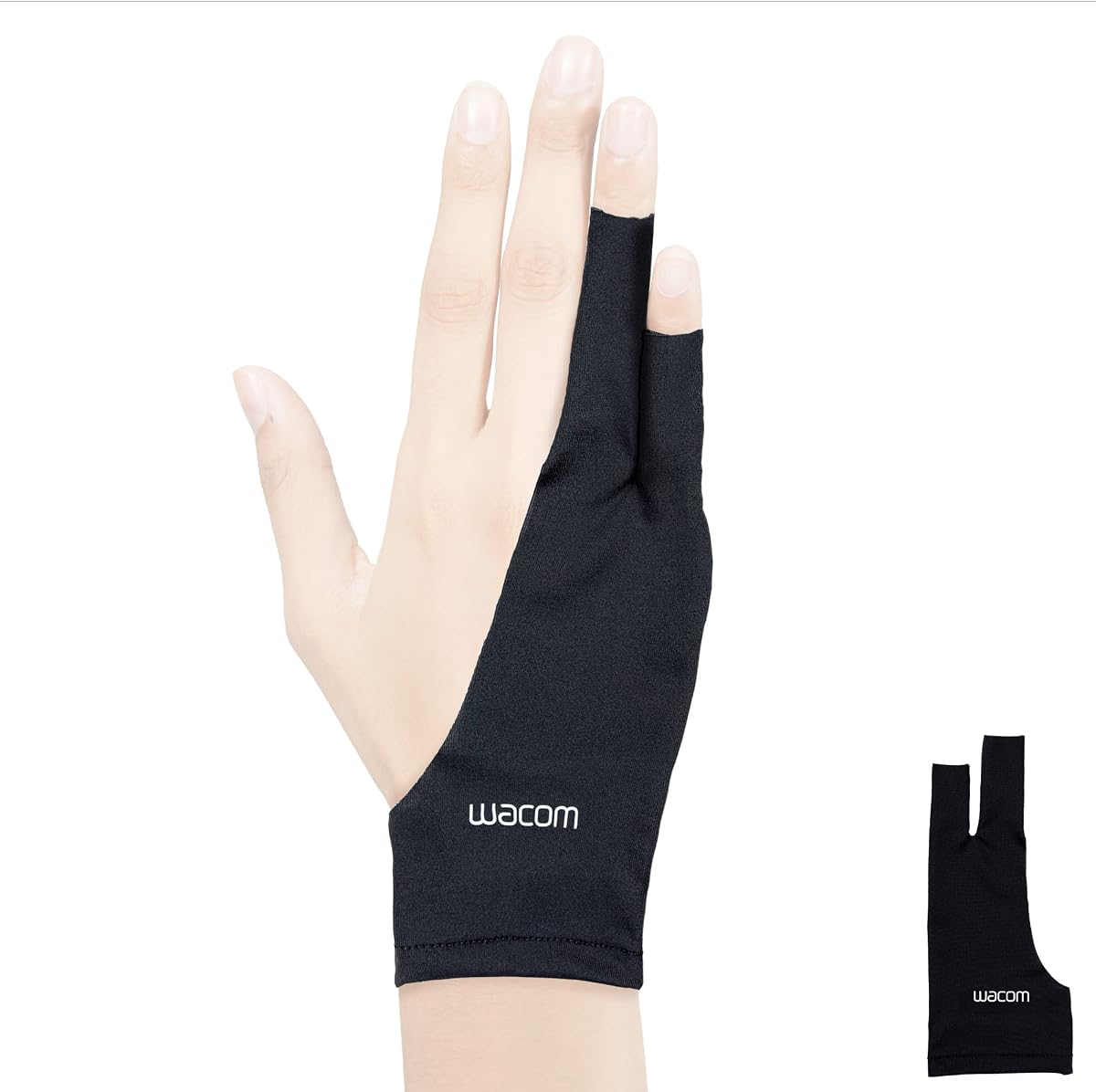
The Wacom glove is a premium choice designed for artists who value sustainability and functionality. With a 4.4 rating, it is made from 90% recycled material for eco-friendly comfort.
We may earn a commission when you buy through this link, at no additional cost to you.
Its exposed fingertip design allows easy access to touchscreen features and typing, making it versatile for hybrid workflows. It glides smoothly over surfaces, reducing friction and preventing smudges.
While the price is higher than some alternatives, the durability and sustainable materials justify the cost. The one-size fit works for most but may not accommodate all hand sizes perfectly.
Artists seeking an eco-conscious option with premium features should consider this glove. It balances environmental responsibility with practical design for digital art creation.
Made from 90% recycled material, this glove offers comfort and stretch while supporting sustainable practices.
Exposed fingertips enable easy access to touch features and keyboards without removing the glove.
We may earn a commission when you buy through this link, at no additional cost to you.
This XPPen glove is designed to fit user habits with a soft, skin-friendly texture that stops smudging on drawing tablets. It holds a 4.5 rating for its comfort and performance in digital art.
We may earn a commission when you buy through this link, at no additional cost to you.
The high elastic material offers excellent air permeability, keeping hands comfortable during use. Available in three sizes, it ensures a better fit for different hand dimensions.
While the black color is resistant to dirt, reducing cleaning frequency, the limited color options may not suit all preferences. Choosing the right size is key for optimal comfort.
Artists looking for a reliable glove with a focus on texture and fit should consider this option. It provides a practical solution for smoother drawing on graphics tablets.
High elastic and air permeable material ensures comfort and flexibility during extended drawing sessions.
The soft texture stops smudging and allows for an easier glide on the tablet surface.
We may earn a commission when you buy through this link, at no additional cost to you.
The OTraki 4 Pack offers great value with four soft gloves made from high-elastic lycra fiber. With a 4.6 rating, users appreciate their comfort and effectiveness in reducing friction.
We may earn a commission when you buy through this link, at no additional cost to you.
Available in multiple sizes, these gloves accommodate different hand shapes, though minor size deviations may occur. They work for both hands and prevent smudges on screens.
While they do not prevent device sensing, closing palm detection ensures smoother use. The soft texture and air permeability make them comfortable for long sessions.
Artists or learners needing multiple gloves for different uses or sizes will find this pack practical. It is a cost-effective solution for digital drawing and sketching needs.
High-elastic lycra fiber ensures softness and breathability for both men and women.
The lightweight design allows smooth hand movement, improving efficiency during digital art creation.
We may earn a commission when you buy through this link, at no additional cost to you.
This XPPen glove combines functionality with a unique cat print design, appealing to artists who want style. It holds a 4.5 rating for its comfort and performance in digital art.
We may earn a commission when you buy through this link, at no additional cost to you.
Made from high elastic material, it is breathable and flexible, ensuring comfort during use. The two-finger design stops smudging on drawing tablets, allowing easier glide.
While the print adds charm, it may wear over time with frequent washing. The black color remains dirt resistant, reducing cleaning needs for the main fabric.
Artists seeking a blend of practicality and personality will find this glove appealing. It offers reliable smudge protection with a touch of unique style.
The cute cat print distinguishes this glove from others, adding a unique flair to your accessories.
High elastic and skin-friendly material ensures comfort and prevents smudging during drawing sessions.
We may earn a commission when you buy through this link, at no additional cost to you.
The OTraki 4 Pack provides four gloves with five size options, ensuring a perfect fit for most users. With a 4.6 rating, it is praised for its comfort and smudge protection.
We may earn a commission when you buy through this link, at no additional cost to you.
Made from high elastic lycra fiber, the fabric wicks moisture, keeping hands dry during long sessions. The design prevents unsightly smudges on screens, preserving your artwork.
While minor size deviations may occur, the variety of sizes increases the chance of a good fit. The black color is stain resistant, reducing cleaning needs.
Artists needing multiple gloves for different sizes or uses will find this pack ideal. It offers practical protection and comfort for digital drawing and sketching.
Moisture-wicking fabric ensures comfort and keeps hands dry during extended creative sessions.
The design shields your artwork from smearing, ensuring your creative work remains pristine.
We may earn a commission when you buy through this link, at no additional cost to you.
This product lacks complete information in the current dataset. Users should check the listing for details on features, materials, and compatibility with their devices.
We may earn a commission when you buy through this link, at no additional cost to you.
Without verified specifications, it is hard to assess performance. However, exploring recent reviews may provide insights into its suitability for digital drawing.
While it may offer value, the lack of data requires careful consideration. Ensure the glove meets your needs before purchasing.
Artists are advised to verify product details before buying. This ensures you select a glove that aligns with your drawing requirements.
Check the product listing for accurate details on size, material, and device compatibility.
Recent reviews may offer insights into the product's performance and suitability for digital art.
We may earn a commission when you buy through this link, at no additional cost to you.
Choosing the right digital drawing glove depends on several factors including fit, material, and compatibility with your device.
Proper fit is essential for comfort and effectiveness. Gloves that are too tight can restrict movement, while loose ones may slip during use. Look for options with multiple size choices to ensure the best match for your hand dimensions.
Always check the size chart before purchasing. A well-fitting glove should feel snug but not restrictive, allowing free finger movement.
Materials like Lycra and Nylon are popular for their flexibility and breathability. High-quality fabrics reduce friction and prevent smudges without feeling bulky. Some gloves also include moisture-wicking properties for added comfort.
Choose materials that feel soft and skin-friendly. This ensures you can draw for long periods without irritation.
Most digital drawing gloves are designed for both left and right hands. This ambidextrous fit allows artists to switch hands or share gloves without issues. Look for gloves that explicitly state this feature.
Verify the product description mentions suitability for both hands. This ensures versatility regardless of your dominant hand.
Two-finger designs are standard, covering the middle and ring fingers while leaving other fingers exposed. This allows for better control and access to touchscreens. Ensure the design matches your drawing style.
Select gloves with appropriate finger coverage. This prevents smudges while maintaining dexterity for detailed work.
Durability affects how long the glove remains effective. Look for gloves with strong tensile strength and stain-resistant colors like black. This reduces the frequency of washing and extends the glove's life.
Check if the product requires frequent cleaning. Low-maintenance options are more practical for daily use.
Ensure the glove works with your specific device, whether it is a drawing tablet, iPad, or other touchscreen. Some gloves include features like palm rejection to prevent accidental inputs.
Read product details for compatibility notes. This ensures the glove enhances rather than hinders your workflow.
Prices vary based on brand and features. Budget options may offer basic protection, while premium gloves provide additional benefits like eco-friendly materials. Consider your needs and frequency of use when deciding.
Compare options within your budget. Look for value packs if you need multiple gloves for different purposes.
Reviews offer insights into real-world performance. High ratings often indicate satisfaction with comfort and effectiveness. Look for comments on fit, durability, and ease of use.
Read multiple reviews before buying. This helps gauge the glove's reliability and suitability for your needs.
To start, ensure your hand is clean and dry before putting on the glove. This prevents dirt from transferring to the device and ensures a comfortable fit.
Adjust the glove so it sits snugly on your hand without being too tight. Make sure the fingers align correctly with your own for optimal control during drawing.
Clean the glove as needed by following the manufacturer's instructions. Hand washing is often recommended to preserve the material and shape for longer use.
Digital drawing gloves are designed to reduce smudges from oils and sweat on your hand. While they are effective, they may not prevent all smudges if the skin touches the screen directly. Always check device compatibility for best results.
Yes, most digital drawing gloves are ambidextrous and designed to fit both left and right hands. Check the product description to confirm suitability for left-handed users before purchasing.
The frequency of washing depends on usage. Many gloves are made with stain-resistant materials, reducing the need for frequent washing. Follow the care instructions provided by the manufacturer to maintain longevity.
Most gloves work with a wide range of drawing tablets and touchscreens. However, compatibility may vary depending on the device. Always verify product details to ensure it fits your specific tablet.
Yes, gloves made from soft, breathable materials like Lycra are designed for comfort during long drawing sessions. Look for options with moisture-wicking properties to keep hands dry.
Choose a size based on your hand measurements. Many gloves come in multiple sizes, so check the size chart provided by the seller. Proper fit ensures comfort and effectiveness.
While primarily designed for digital devices, some gloves can be used for traditional art to prevent smudges. However, they are optimized for smooth surfaces like tablets and screens.
Some gloves are made from recycled materials, offering eco-friendly options for artists. Check the product description for sustainability features if this is important to you.
In summary, the top picks include the Artist Drawing Glove 3-Layer for overall performance, the HUION glove for budget-friendly value, and the Wacom glove for premium eco-friendly features.
When choosing, prioritize fit, material quality, and compatibility with your device. These factors ensure comfort and effectiveness during your creative sessions.
Remember to check current prices and availability before purchasing, as these may change over time. Select the glove that best suits your needs for a smooth digital art experience.