
Thermaltake View 380 TG ARGB
4.7Editor score
Dual chamber pillarless glass
Hidden connector motherboard support
Pre-installed ARGB fans included
Discover the top dual system PC cases for parallel computing and advanced builds. This guide compares airflow, support, and modularity for enthusiasts.
Dual system PC cases offer a unique solution for enthusiasts who need parallel computing power within a single chassis. These specialized enclosures allow you to install two separate motherboards and power supplies efficiently.
We evaluated ten top models based on airflow capacity, modular design, and cooling support. Each product was assessed for its ability to handle high-end components while maintaining a clean aesthetic and practical build experience.
Our picks highlight specific strengths like thermal performance, cable management, and expandability. Prices and availability may change, so verify current listings before purchasing to ensure you get the best value for your setup.
4.7Editor score

4.8Editor score

4.3Editor score
Explore the detailed side-by-side comparison of the top ten dual system PC cases available this month. Each entry highlights core specifications to help you identify the perfect fit for your multi-system build requirements.
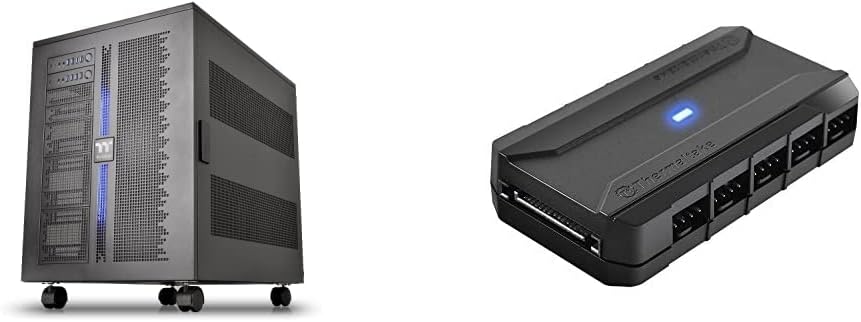


The Thermaltake Core W200 stands out as a flagship solution for those needing maximum parallel computing power. It supports installing two complete systems in a back-to-back configuration effectively.
We may earn a commission when you buy through this link, at no additional cost to you.
Its fully modular design allows for total breakdown which aids in maintenance and customization. The included Commander FP hub powers ten PWM fans expanding cooling capabilities significantly.
While it supports up to 600mm radiators for custom liquid cooling builds the size is substantial. Users should ensure their desk or floor space can accommodate such a large chassis.
This chassis is ideal for workstation enthusiasts or testers needing distinct environments. The bundle provides everything needed for a complete high-performance dual system experience.
Allows two motherboards power supplies and VGA cards in one unit.
Commander FP hub enables simultaneous control of up to ten fans.
We may earn a commission when you buy through this link, at no additional cost to you.
The Cooler Master HAF II 500 delivers impressive airflow performance at a competitive price point. It features an oversized Mighty40 cooling system with large fans for better throughput.
We may earn a commission when you buy through this link, at no additional cost to you.
Split-level cable management optimizes routing space ensuring clean builds. The MasterRail mounting system supports various fan and radiator sizes for flexibility.
It offers a Dual-Mode GPU holder that stabilizes single or dual GPU setups. Storage options adapt based on PSU length which is a thoughtful design touch.
This case is perfect for builders prioritizing raw cooling and utility over flash. It balances cost with high-performance features effectively for daily users.
Low resistance design with large ventilation openings improves cooling.
Dual holder clamps single GPU or supports two GPUs up to 3.6 slots.
We may earn a commission when you buy through this link, at no additional cost to you.
The NZXT H9 Flow RGB+ combines premium aesthetics with functional dual-chamber design. It separates main components from the PSU and drives for improved thermal performance.
We may earn a commission when you buy through this link, at no additional cost to you.
Perforated steel panels ensure efficient cooling while the wraparound glass showcases every detail. It supports up to nine 140mm fans for versatile cooling layouts.
The case is back-connect ready supporting boards like ASUS BTF and MSI Project Zero. Extra-wide cable channels and built-in Velcro straps make routing effortless.
This pick suits builders who want a clean look with hidden cables. It is ideal for high-end builds where visual impact and thermal efficiency matter most.
Separates components for improved thermal performance and cable management.
Compatible with rear-connecting motherboards for a cable-free look.
We may earn a commission when you buy through this link, at no additional cost to you.
The Antec Flux Pro features a unique combination of metal glass and wood for a premium texture. It supports up to 12 fans simultaneously for maximum cooling potential.
We may earn a commission when you buy through this link, at no additional cost to you.
The iShift PSU mount offers a 90-degree option and includes dual temperature display. Removable cooling brackets add flexibility to top front and shroud placements.
It supports simultaneous installation of 420mm and 360mm radiators easily. The ventilation design allows for robust airflow without excessive noise generation.
This chassis is great for users seeking a distinct aesthetic and strong cooling. It balances innovative features with practical performance for demanding systems.
Crafted with metal glass and wood for high-quality texture.
Innovative iShift mount and dual temperature display included.
We may earn a commission when you buy through this link, at no additional cost to you.
The ASUS TUF Gaming GT502 divides internals into two chambers for clean building. It allows you to configure independent cooling zones for CPU and GPU effectively.
We may earn a commission when you buy through this link, at no additional cost to you.
Tool-free side panels remove simply by pressing a button on the rear. Panoramic tempered glass panels provide a tasteful tinted view of components.
Front panel connectivity includes USB 3.2 Gen 2 Type-C and RGB buttons. Versatile graphic card mounting options support vertical setups and reduce sag.
This case is perfect for gamers who value organized cable routing. The dual-chamber design supports distinct thermal management for each component group.
Divides internals for independent cooling zones.
High-speed USB 3.2 Gen 2 Type-C port available.
We may earn a commission when you buy through this link, at no additional cost to you.
The ASUS ROG Strix Helios II is built for showcase builds with premium aluminum and grille. It supports E-ATX motherboards and graphics cards up to 450mm long.
We may earn a commission when you buy through this link, at no additional cost to you.
Pre-installed fans deliver ultimate airflow for high-performance systems. Tidy PC building is enabled by multifunction covers and PSU shrouds.
The I/O panel features two USB 20Gbps Type-C ports and ARGB control. Detachable PSU brackets help organize cables for a cleaner look.
This case suits creators needing robust support for massive hardware. It combines aesthetics with the durability required for professional workstation setups.
Aluminum front with diamond-grille for effective cooling.
Supports graphics cards up to 450mm with braces.
We may earn a commission when you buy through this link, at no additional cost to you.
The HAVN HS 420 uses a hybrid structure for optimal GPU cooling and balance. It fits eleven 140mm fans and supports 420mm radiators on multiple sides.
We may earn a commission when you buy through this link, at no additional cost to you.
Heat-formed UniSheet glass minimizes visual distortion for a clear view. The SimpliCable routing system with fan hub organizes cables neatly.
Customizable space fits combinations of storage fans and displays. Flexible rubber pads on fan brackets isolate vibration to avoid noise.
This case is ideal for custom builders who need versatile layouts. Its design prioritizes both aesthetics and functional thermal efficiency.
Optimized for GPU cooling and balanced airflow.
SimpliCable routing system for pristine appearance.
We may earn a commission when you buy through this link, at no additional cost to you.
The NZXT H6 RGB+ is a compact dual-chamber design ideal for smaller spaces. It isolates power and cables from your main build efficiently.
We may earn a commission when you buy through this link, at no additional cost to you.
A seamless curved glass panel provides a minimal distortion view of components. High-airflow mesh across panels improves intake without restricting airflow.
It ships without fans allowing full customization of cooling and lighting. An integrated anti-sag bracket keeps heavy GPUs firmly supported.
This case suits users needing a clean look in a tighter footprint. The design ensures efficient cooling despite the compact size.
Ideal for smaller spaces while maintaining cooling power.
Ships without fans for full customization flexibility.
We may earn a commission when you buy through this link, at no additional cost to you.
The Thermaltake Capo X delivers parallel operation from a single chassis effectively. It can house two independent mATX systems simultaneously in the same footprint.
We may earn a commission when you buy through this link, at no additional cost to you.
Configurable cooling supports up to thirteen 120mm fans for both systems. Hidden connector support allows cables to be tucked away for a cleaner build.
Each system features its own I/O with power reset and USB ports. Detachable GPU braces mount directly to the chassis frame for stability.
This chassis is perfect for testing or dual-purpose setups. Its unique layout ensures minimal interference between parallel computing tasks.
Allows parallel operation of two mATX systems.
Each system has its own power and USB ports.
We may earn a commission when you buy through this link, at no additional cost to you.
The Thermaltake View 380 offers a pillarless front and side glass panel for visibility. It supports hidden-connector motherboards and includes four ARGB fans.
We may earn a commission when you buy through this link, at no additional cost to you.
The dual chamber design helps organize components better for airflow and looks. I/O ports include USB 3.2 Type-C and USB 3.0 for connectivity.
It supports up to 360mm radiators and 415mm VGA length for upgrades. This case is a strong choice for budget builds needing aesthetic appeal.
This pick is great for entry-level enthusiasts. It provides a clean look and practical support without a high price tag.
Front and side glass panels without pillars for clear view.
Compatible with motherboards that hide cable connectors.
We may earn a commission when you buy through this link, at no additional cost to you.
Selecting a dual system case requires understanding specific features like cooling capacity and motherboard support. These factors ensure your build remains stable and efficient.
Verify if the case supports two motherboards and power supplies effectively. Some models are designed for parallel mATX systems while others support larger ATX setups.
Ensure the chosen case meets your specific hardware requirements for a stable build.
Dual systems generate more heat so look for cases with high fan support. Check for maximum radiator sizes and airflow openings to keep temperatures down.
Prioritize models with removable brackets or modular layouts for flexible cooling.
Managing cables for two systems can be complex so look for wide channels. Features like hidden connector support help keep the interior clean and organized.
Adequate cable routing space prevents accidental disconnections during upgrades.
Premium materials like steel aluminum or wood impact durability and aesthetics. Ensure the case is sturdy enough to hold heavy GPUs and radiators securely.
High-quality construction reduces vibration and improves longevity of components.
Check storage cage flexibility and support for large drives or adapters. Future upgrades often require space for additional components or larger hardware.
A versatile case grows with your needs without requiring frequent replacements.
Glass panels and lighting options allow you to showcase your build effectively. Panoramic views can enhance the visual appeal of complex dual setups.
Consider if tinted or clear glass best fits your preferred aesthetic style.
Install your motherboards and power supplies carefully to avoid interference. Follow the manufacturer's instructions for mounting to ensure stability.
Manage cables by using the included ties and brackets to maintain airflow. Proper routing prevents blockage and reduces noise from loose wires.
Regularly clean dust filters and fans to keep cooling performance optimal. Dust buildup can restrict airflow and cause overheating in dual setups.
A dual system case allows you to install two independent computers inside one chassis. It typically supports two motherboards power supplies and GPUs in a back-to-back configuration.
They are worth it for users needing parallel computing power or separate environments. They save desk space and reduce clutter compared to using two separate towers.
Some cases require mATX boards while others support ATX. Check specifications for motherboard support to ensure compatibility with your existing hardware.
Look for cases with high fan capacity and removable radiators. Ensure there is enough airflow to reach both sets of components effectively.
Most dual cases are modular allowing upgrades to GPUs and storage. Check cable access and internal dimensions before purchasing new parts.
Yes many modern cases support hidden connector motherboards like ASUS BTF. This helps hide cable connections for a cleaner build look.
Our top picks range from the affordable View 380 to the premium Core W200. Each offers unique benefits for different build requirements and budgets.
Prioritize cooling capacity and dual compatibility before choosing a model. Ensuring hardware support helps avoid costly issues during installation.
Prices and availability may change so check current listings before purchasing. Verify all specifications match your needs to get the best value.