
NexiGo N60 1080P
4.3Editor score
Full HD 1080p video
Built-in noise-canceling mic
Privacy cover included
Plug and play setup
Finding the right external webcam for your Mac is essential for clear video calls and streaming. The best models offer sharp resolution, reliable autofocus, and built-in microphones that work seamlessly with macOS without needing extra drivers or complex setup steps.
We compared ten highly rated webcams based on image quality, audio performance, privacy features, and ease of use. Each product was evaluated for its compatibility with Apple devices, build quality, and ability to deliver professional results for work or content creation.
Each pick highlights key strengths, pros, cons, and ideal use cases to help you choose confidently. Prices and availability can change quickly, so check the latest details before buying. This guide ensures you find a webcam that matches your specific needs and budget.
4.3Editor score

4.6Editor score

4.6Editor score
As an Amazon Associate we earn from qualifying purchases.
This side-by-side comparison outlines the key specifications and standout features of each webcam to help you decide quickly.




This Acer 4K webcam stands out as the top choice for Mac users seeking professional-grade video quality. With a 4.6 rating, it delivers true 4K resolution powered by a genuine Sony sensor that captures sharp details even in dim environments.
We may earn a commission when you buy through this link, at no additional cost to you.
The Phase Detection Autofocus ensures your subject stays crisp during movement, while the aerospace-grade aluminum body provides durability and effective heat dissipation. Dual microphones filter out background noise for clear audio up to 2.5 meters away.
While the price is higher than budget options, the build quality and performance justify the investment for frequent video conferencing or streaming. The magnetic privacy cover adds an extra layer of security when the camera is not in use.
Ideal for professionals and creators who need reliable, high-resolution video on their Mac. This webcam combines premium materials with advanced optics to deliver consistent results across Zoom, Teams, and other platforms.
The Sony 1/2-inch sensor captures true-to-life visuals with balanced exposure and rich detail for every call.
Crafted from CNC-machined aluminum, this webcam offers a durable, elegant look that matches Mac aesthetics perfectly.
We may earn a commission when you buy through this link, at no additional cost to you.
The Anker PowerConf C200 offers a compelling balance of resolution and price for Mac users. Rated 4.4, it provides 2K clarity that surpasses standard 1080p models while maintaining a compact footprint.
We may earn a commission when you buy through this link, at no additional cost to you.
Dual mics with AI noise cancellation ensure your voice comes through clearly in noisy environments. The webcam also adapts well to low-light settings, making it suitable for late-night calls without additional ring lights.
One trade-off is that angle adjustments require software configuration, which may be less convenient than hardware controls. However, the integrated privacy cover offers quick access to security between meetings.
This model suits remote workers who want better than HD resolution without the cost of 4K. Its versatility and audio features make it a strong contender for daily Mac usage.
Advanced noise cancellation filters out clicks and hums so your voice remains the focus during every call.
Choose from 65, 78, or 95 degree views to frame yourself perfectly for any virtual meeting setup.
We may earn a commission when you buy through this link, at no additional cost to you.
The EMEET C960 delivers genuine 4K video quality at a budget-friendly price point. Rated 4.5, it stands out for its true CMOS sensor that avoids digital upscaling for natural sharpness.
We may earn a commission when you buy through this link, at no additional cost to you.
PDAF autofocus keeps your image crisp during shifts, and the dual omnidirectional mics capture clear sound from various angles. It also includes a privacy cover for peace of mind during non-call hours.
Note that default resolution may be 1080p, requiring a switch via compatible apps to unlock full 4K. While this adds a small step, the overall value remains high for the image quality.
Best for students and freelancers needing high resolution without breaking the bank. Its adjustable mounts allow versatile placement on monitors or tripods across your workspace.
Experience genuine 4K clarity with a dedicated sensor that ensures every detail is rendered accurately.
Flexible axes and tripod threads let you position the camera exactly where your workflow needs it most.
We may earn a commission when you buy through this link, at no additional cost to you.
The NexiGo N60 is the top pick for budget-conscious Mac users. With a 4.3 rating, it offers reliable 1080p video at 30fps that covers most casual and professional needs without extra costs.
We may earn a commission when you buy through this link, at no additional cost to you.
Plug-and-play functionality means instant setup on macOS without installing drivers. The glass lens provides a crisp image at typical desk distances, and the built-in mic reduces ambient noise for clearer communication.
Fixed focus limits flexibility for wide shots or movement, but for seated calls, it performs well. The privacy cover adds essential security, making it a complete package for minimal expense.
Ideal for occasional users who need a dependable webcam without premium features. Its simplicity and price make it the go-to recommendation for basic video conferencing on Mac.
Connect via USB and start calling within minutes as no additional software or drivers are needed.
A physical privacy cover ensures your camera lens stays blocked when not in active use.
We may earn a commission when you buy through this link, at no additional cost to you.
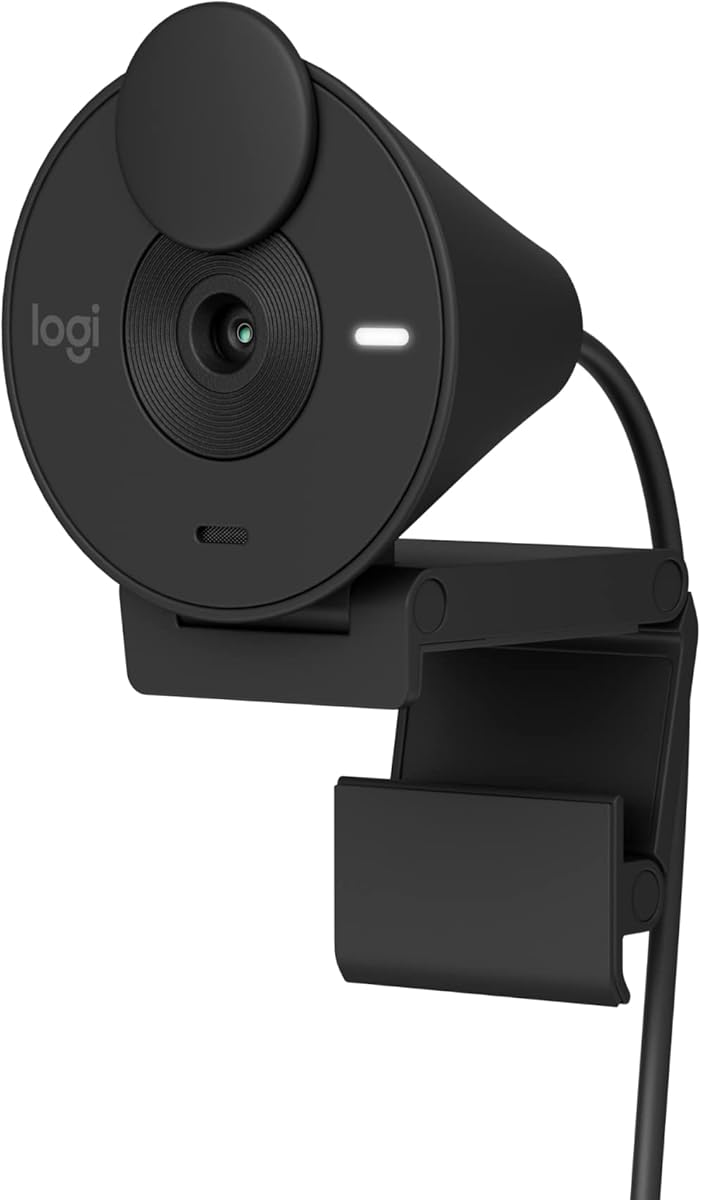
The Logitech Brio 100 blends style with performance, earning a 4.4 rating among Mac users. Its Full HD 1080p resolution delivers clear video suitable for both work meetings and casual streaming.
We may earn a commission when you buy through this link, at no additional cost to you.
RightLight technology boosts brightness by up to 50%, reducing shadows and ensuring you look your best even in dim rooms. The slide privacy cover offers quick access to secure your lens between calls.
While autofocus is absent, the fixed lens works well for stationary setups. The use of recycled plastic appeals to eco-conscious buyers without compromising on build durability or functionality.
Choose this model if aesthetics and brightness matter most for your setup. It provides a reliable, stylish webcam that integrates smoothly into professional macOS environments.
Automatic light balance reduces shadows and increases visibility for a professional look in any room.
Constructed with at least 34 percent post-consumer recycled plastic to support sustainability goals.
We may earn a commission when you buy through this link, at no additional cost to you.
The Logitech Brio 301 is designed for seamless integration into workplace environments with a 4.4 rating. It delivers Full HD video that ensures you look clear and natural across all major meeting apps.
We may earn a commission when you buy through this link, at no additional cost to you.
RightLight 2 automatically compensates for poor lighting so you stay visible even in tricky conditions. The spin privacy shutter offers fast control, and the noise-reducing mic keeps conversations focused.
As a mono mic, audio lacks stereo richness but remains clear enough for standard calls. Certification for Zoom and Teams ensures compatibility without manual configuration on macOS.
Best for corporate users needing reliable, certified hardware that integrates well with IT standards. It balances quality and ease of use for consistent daily video conferencing.
Officially certified for Zoom and Microsoft Teams to guarantee smooth operation on enterprise networks.
A simple twist blocks the lens instantly for quick privacy between meetings or when stepping away.
We may earn a commission when you buy through this link, at no additional cost to you.
The Logitech C920e earns a 4.6 rating as a top choice for business users. It offers 1080p HD video with a balanced 78-degree field of view that frames individuals neatly without excessive background.
We may earn a commission when you buy through this link, at no additional cost to you.
Two omnidirectional microphones capture natural sound from up to one meter away, improving audio quality during presentations. The attachable privacy screen flips easily to secure your privacy when needed.
Fixed FOV limits wide shots, but the sturdy clip ensures stability on monitors or laptops. TAA compliance and device management tools support organizational IT requirements effectively.
Perfect for teams needing certified, secure hardware with consistent video and audio performance. It combines professional-grade reliability with straightforward setup for any office.
Certified for Zoom and Microsoft Teams ensures seamless integration and optimized performance in meetings.
An attachable privacy screen flips down to cover the lens and prevent any unauthorized viewing.
We may earn a commission when you buy through this link, at no additional cost to you.
The Logitech C922x tops premium options with a 4.6 rating and versatile video modes. It supports 1080p at 30fps for sharp images or 720p at 60fps for smoother motion during dynamic content.
We may earn a commission when you buy through this link, at no additional cost to you.
HD light correction fine-tunes brightness automatically, while stereo mics capture natural sound for immersive calls. XSplit VCam software provides background removal without needing a green screen.
Lacking a privacy shutter requires external attention, but the added features outweigh this for creators. The premium build ensures longevity and consistent performance across diverse lighting conditions.
Best suited for streamers and professionals needing high-quality video flexibility. Its advanced software support and audio features make it ideal for content creation on Mac.
Switch between 1080p for clarity or 720p for smooth motion depending on your streaming needs.
Dual microphones provide rich stereo sound so your voice feels natural during any video session.
We may earn a commission when you buy through this link, at no additional cost to you.
The Logitech C920S is a classic with a 4.6 rating offering consistent 1080p HD video. Its HD autofocus ensures sharp images across various distances, maintaining clarity during movement.
We may earn a commission when you buy through this link, at no additional cost to you.
Stereo audio with dual mics provides natural sound for meetings. A privacy shutter gives quick control over lens visibility, ensuring security whenever calls end.
While it lacks newer AI features, its reliability and broad platform support make it a safe choice for any Mac user. It remains a staple in many professional setups for good reason.
Ideal for users prioritizing stability and simplicity. The combination of quality video, audio, and security features makes it a dependable everyday webcam.
Years of successful use make this model a trusted standard for video conferencing worldwide.
A snug privacy cover protects the lens and gives you instant control over when others can see you.
We may earn a commission when you buy through this link, at no additional cost to you.
This Acer 4K model shares the premium features of the top pick but offers enhanced portability. At 57 grams, it is incredibly light, making it perfect for travelers and remote workers.
We may earn a commission when you buy through this link, at no additional cost to you.
The all-metal body ensures efficient heat dissipation during long sessions. Sony sensor delivers true 4K visuals, and dual microphones ensure clarity up to 2.5 meters away.
While it uses USB-A, adapters are included for Mac compatibility. The magnetic privacy cover secures the lens effortlessly. This model suits mobile users needing high specs without bulk.
Choose this if you need a travel-friendly camera without sacrificing image quality. It balances premium performance with compact design for versatile use anywhere.
Weighing only 57 grams, this webcam is easy to carry in any laptop bag for travel.
All-aluminum construction dissipates heat quickly to maintain stable performance during long sessions.
We may earn a commission when you buy through this link, at no additional cost to you.
Selecting the right webcam involves balancing resolution, audio quality, privacy features, and compatibility with macOS to ensure reliable video performance.
Resolution determines clarity on screen. For professional use, 1080p is standard, while 4K offers finer details if supported by your Mac and internet. A larger sensor captures better light, reducing grain in darker rooms.
Look for native 4K or true 1080p CMOS sensors rather than interpolated specs for accurate image quality.
Autofocus keeps your face sharp during movement. Phase Detection Autofocus (PDAF) is faster and more stable than standard methods, ensuring minimal blur during active calls.
Prioritize webcams with PDAF if you move often or share items during meetings to maintain consistent sharpness.
Built-in microphones vary widely. Dual mics with noise cancellation filter out background sounds like keys or fans for clearer voice transmission.
Choose models with dedicated noise reduction technology if you lack external audio gear.
FOV defines how much of your room fits in frame. Narrower angles suit individual calls, while wider ones capture groups or backgrounds.
Match FOV to your setup to avoid showing too much clutter or cutting out collaborators.
Good webcams adjust exposure automatically. Features like RightLight or AI correction boost brightness and reduce shadows without extra lighting.
Check for low-light claims if you often work in dim environments to maintain professional appearance.
A physical shutter or cover protects your privacy when not on camera. Electronic controls may lag or fail, so physical covers add reliability.
Ensure every webcam on your list has a secure cover to prevent unauthorized access.
Plug-and-play USB webcams work instantly on macOS. Avoid models needing complex drivers unless extra features are essential.
Check ports on your Mac and ensure the webcam cable or adapter matches your available inputs.
Durable materials like metal resist wear and heat. Mounting clips should fit various monitor bezels or laptops securely.
Look for tripod threads if you need flexible positioning beyond standard clips.
Connect the webcam directly to a USB port using the included cable or an adapter. macOS will recognize it automatically without driver installation in most cases.
Open System Settings and check Privacy permissions to allow apps access to the camera. Adjust app-specific settings within Zoom or Teams to select the webcam as the default video source.
Keep the lens clean with a microfiber cloth and avoid harsh chemicals. Store the webcam in a cool, dry place when not in use to extend its lifespan.
Yes, most of these models are designed for plug-and-play compatibility with macOS 10.11 and later versions including Ventura and Sonoma. Check product details for specific OS requirements to ensure seamless integration.
You can use the webcam, but performance depends on your Mac's processing power and USB port speed. Older devices may default to 1080p to maintain smooth frame rates during calls.
Go to System Settings, open Privacy and Security, then find Camera in the list. Toggle your video conferencing app to allow access and restart the app to apply changes.
Most work without software. Some offer apps for advanced settings like angle adjustment, but basic video and audio functions start instantly after plugging in via USB.
Models with dual omnidirectional mics and noise cancellation generally provide the best built-in audio. The Acer 4K and Logitech C922x are strong contenders for clear voice capture.
A physical cover offers reliable privacy protection regardless of software settings. It is highly recommended for preventing accidental exposure or unauthorized access to your camera lens.
The Acer 4K Webcam leads our list with its exceptional 4K image quality and premium build, making it ideal for professionals and creators. The NexiGo N60 offers excellent value for budget buyers, while the Logitech C922x suits advanced users needing flexible frame rates.
Prioritize your main use case. If low-light performance is key, look for advanced sensors and light correction. For secure setups, ensure a physical privacy shutter is included with your selected model.
Prices fluctuate often, so verify current deals before purchasing. With the right choice, your Mac will deliver sharper and clearer video calls that elevate your professional and personal communication.