
Redragon K686 HE Wired Hall-Effect Keyboard
4.4Editor score
One-Knob Media Control
UltraMag POM Magnetic Switches
Rapid Trigger Technology
Anti-Wobble Floating Structure
This guide compares the top Hall Effect Keyboards for Gaming available in October 2026, evaluating polling rates, switch precision, actuation travel, and
Hall Effect Keyboards for Gaming represent a major leap in input technology, replacing physical contacts with magnetic sensors for faster response times and infinite adjustability. Gamers seeking every millisecond advantage now prioritize keyboards that offer rapid trigger modes and customizable actuation points to match their exact play styles. This shift from traditional mechanical switches ensures smoother movement and reduced input lag in competitive shooters.
We evaluated ten leading models based on their polling rates, switch durability, build quality, and software ecosystems. Our analysis focuses on real-world performance metrics like latency, sound dampening, and the flexibility of magnetic switch adjustments. Each product was scrutinized for its ability to deliver consistent performance during high-intensity gaming sessions across different genres and setups.
Each pick in this list highlights specific strengths, whether it is budget-friendly value, premium wireless connectivity, or extreme compactness for desk space optimization. While we provide detailed specifications and feature breakdowns to help you choose, remember that prices and availability can change frequently. Always check the latest deals before making your final decision to ensure you get the best value.
4.4Editor score

4.7Editor score
4.6Editor score
The following table provides a side-by-side comparison of all ten Hall Effect Keyboards for Gaming featured in this guide. It highlights key specifications like polling rates, switch types, layout sizes, and unique features to help you quickly identify the model that fits your specific needs and budget constraints.




The EPOMAKER G84 HE stands out as a top contender in the Hall Effect Keyboards for Gaming market with its 8K polling rate and adjustable actuation. Its wireless capability and high battery life make it ideal for players who want performance without cable clutter. The rating reflects strong user satisfaction regarding its build quality and responsiveness.
We may earn a commission when you buy through this link, at no additional cost to you.
Its Hall Effect switches allow actuation adjustments as fine as 0.01mm, providing unmatched precision for competitive gamers. Features like SOCD logic and DKS enable complex inputs like instant direction changes or single-key combos. The gasket mount design ensures a creamy typing sound that reduces fatigue during long sessions.
While the software offers deep customization, it may take some time to master all its functions. Additionally, the price is higher than many wired alternatives, but the wireless freedom and advanced features justify the cost for serious enthusiasts. Most users find the trade-off acceptable given the performance gains.
This keyboard is perfect for gamers who need flexibility and precision in their setup. Whether you play FPS games or require a versatile board for work, the G84 HE delivers consistently. It is highly recommended for those seeking a premium wireless Hall Effect experience.
Adjust actuation points to match your exact finger movement needs for faster reactions in games.
Switch seamlessly between PC, Mac, and mobile devices with tri-mode wireless and wired options.
We may earn a commission when you buy through this link, at no additional cost to you.
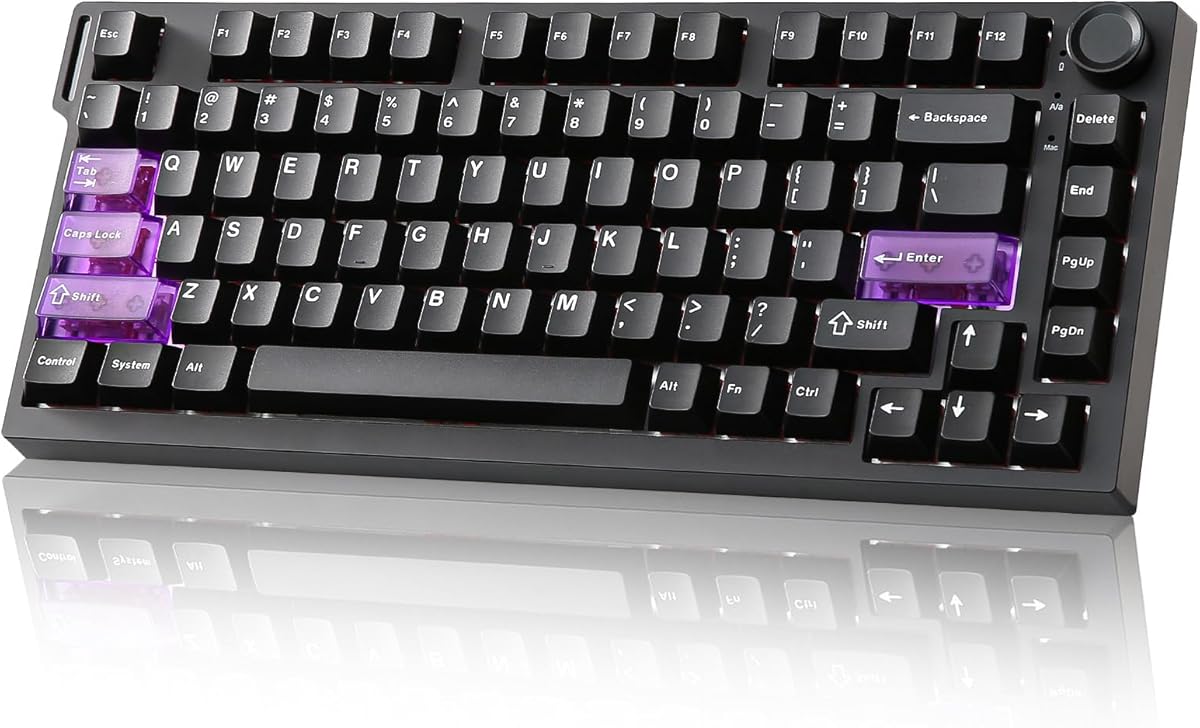
The Redragon K686 HE brings Hall Effect technology to a budget-friendly price point without sacrificing core gaming features. It includes rapid trigger capabilities and high polling rates that are essential for competitive play. Users appreciate its straightforward design and effective noise dampening features.
We may earn a commission when you buy through this link, at no additional cost to you.
Its magnetic switches eliminate physical contact to reduce latency and wear over time. The dual-module floating structure provides a soft bounce that feels premium for the price. A single knob simplifies volume and media control, reducing the need for complex shortcuts during gameplay.
Lack of wireless support limits mobility, making it best for stationary setups. The software is functional but less intuitive than higher-end options. However, for those prioritizing raw performance over connectivity, this keyboard remains a solid choice.
Ideal for budget-conscious gamers who still demand high-end performance metrics. If you prefer wired reliability and want to save money on a Hall Effect board, this model delivers strong results. It serves as an excellent entry point into magnetic switch technology.
Get advanced magnetic switch features at a fraction of the cost of premium competitors.
Adjust brightness and playback quickly with one easy-to-use control knob.
We may earn a commission when you buy through this link, at no additional cost to you.
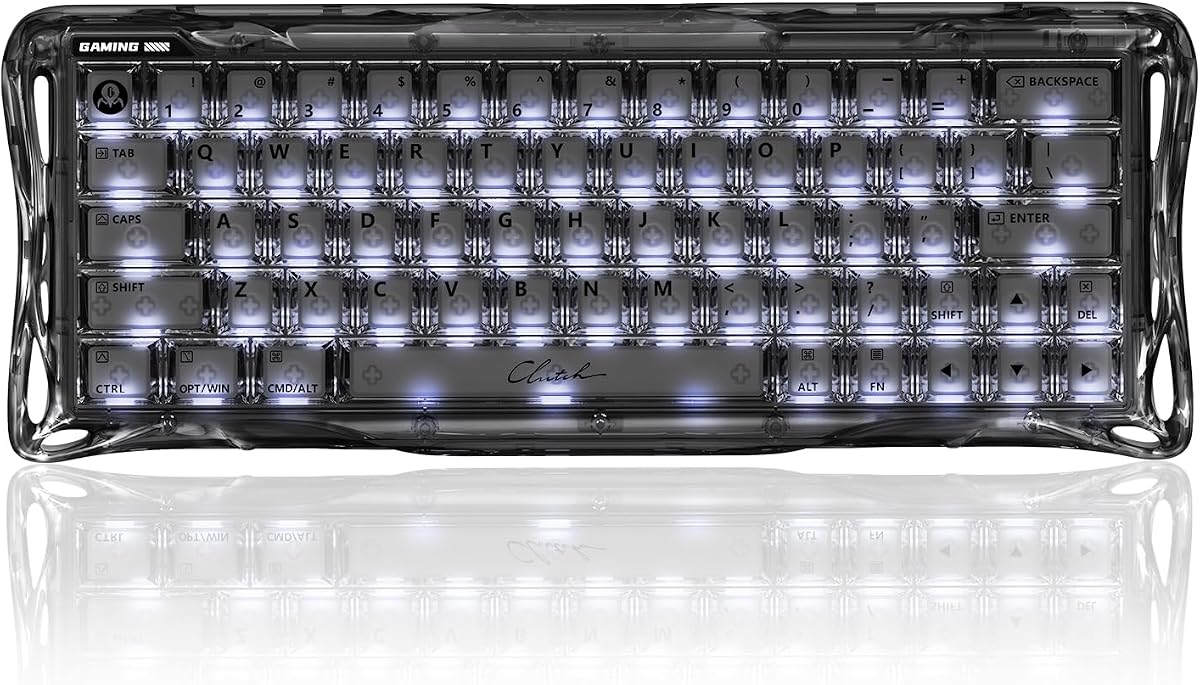
The GravaStar Mercury V60 HE offers a futuristic design combined with ultra-precise magnetic switches. It supports adjustments down to 0.005mm, allowing for extreme sensitivity tuning. The crystal RGB chassis creates a visually immersive environment that stands out on any desk.
We may earn a commission when you buy through this link, at no additional cost to you.
Its hot-swappable design lets you experiment with different Hall Effect switches easily. The multi-layer acoustic foam ensures a clean sound profile without excessive noise. Rapid trigger technology enhances counter-strafing and directional changes significantly in competitive games.
The unique design adds to the cost, making it a niche product for enthusiasts. Limited layout availability might not suit everyone needing numpad functionality. However, for those who value aesthetics and precision equally, it offers a unique value proposition.
Recommended for gamers who want both a visually striking setup and high-end performance. This keyboard is perfect for creating a custom, immersive gaming station. It is best for users who prioritize unique design and maximum adjustability.
The crystal chassis transforms your gaming setup into a sci-fi battle station with deep RGB lighting.
Hot-swappable switches allow you to change tactile feedback without needing a soldering iron.
We may earn a commission when you buy through this link, at no additional cost to you.
Logitech G PRO X TKL is designed with input athletes to ensure consistent performance in high-pressure scenarios. It features rapid trigger capabilities and adjustable actuation to optimize speed. The brand reputation adds a layer of trust for long-term durability.
We may earn a commission when you buy through this link, at no additional cost to you.
Its key control features allow building multi-action combos on single keys for complex play styles. RGB lighting syncs with games to enhance immersion during gameplay. You can adjust settings directly via function keys for quick changes without software.
Software reliance for advanced features can be a hurdle for those who prefer hardware-only setups. The price is steep compared to competitors, reflecting its pro-grade status. However, for tournament players, this reliability is worth the investment.
This keyboard is best for competitive players who need consistent, reliable hardware. If you value a well-known brand and professional-grade features, this model fits well. It is highly recommended for esports setups and serious gamers.
Developed with top esports athletes to ensure performance meets the highest competitive standards.
Adjust switch settings on the fly using dedicated function keys for immediate optimization.
We may earn a commission when you buy through this link, at no additional cost to you.
The ASUS ROG Falchion Ace HFX combines compactness with advanced features like an interactive touch panel. It uses magnetic switches for rapid trigger and speed tap modes essential for FPS games. The 65% layout saves desk space while keeping key keys available.
We may earn a commission when you buy through this link, at no additional cost to you.
Dual USB-C ports allow easy switching between two PCs for seamless workflow. The touch panel controls media and lighting intuitively, reducing reliance on complex key combos. PBT keycaps resist wear and provide a premium typing feel over time.
Some users may find the compact layout restrictive for tasks needing a numpad. The touch panel, while innovative, might require periodic cleaning. However, for desk space optimizers, these trade-offs are well balanced.
This keyboard is perfect for gamers with limited desk space or dual PC setups. If portability and modern features like touch controls are priorities, this model excels. It is highly recommended for versatile desktop environments.
Use the touch panel to manage volume and lighting without interrupting gameplay.
Switch between work and gaming PCs instantly with dual USB-C connectivity.
We may earn a commission when you buy through this link, at no additional cost to you.
The EPOMAKER HE80 provides a 75% layout that balances compactness with essential keys. It features a high scan rate and adjustable actuation for precise inputs. Web-based driver simplifies setup by avoiding large software downloads.
We may earn a commission when you buy through this link, at no additional cost to you.
Double-shot PBT keycaps ensure legends remain clear and resistant to wear over time. Snap Key logic and Dynamic Keystroke support complex inputs in gaming. Sound dampening materials enhance acoustic feedback for a pleasing typing experience.
Browser-based software can be less stable than native apps for some users. Wired connectivity limits it to stationary setups primarily. However, for those wanting a versatile layout, this model offers strong performance.
Ideal for users seeking a middle ground between full-size and compact boards. If you value a web-based ecosystem and durability, this keyboard meets those needs. It is highly recommended for balanced daily gaming and work.
Customize settings directly in your browser to avoid installing heavy software applications.
The 75% layout keeps arrow keys while freeing up space for mouse movement.
We may earn a commission when you buy through this link, at no additional cost to you.
The Razer Huntsman V3 HE Mini is designed for competitive FPS play with rapid trigger and 8K polling. It uses magnetic switches to reduce latency and improve response times. The 65% form factor is ideal for minimizing wrist movement.
We may earn a commission when you buy through this link, at no additional cost to you.
Razer Snap Tap prioritizes last input for faster directional changes in shooters. The aluminum alloy case ensures durability against heavy daily use. PBT keycaps resist shine and provide a textured feel for better grip.
The web-based Synapse tool restricts configuration options compared to full software. The compact layout removes arrow keys and function keys, which may hinder workflow. However, for esports gamers, the performance focus outweighs these issues.
This keyboard suits players focused purely on competitive gaming performance. If you prefer compact boards and need high-speed inputs, this is a strong choice. It is best for tournament setups and fast-paced action games.
Razer Snap Tap ensures the last key press wins for faster directional changes in games.
Built with a strong aluminum case to withstand intensive daily gaming sessions.
We may earn a commission when you buy through this link, at no additional cost to you.
The YUNZII RT75 PRO delivers 8K polling over wireless connections, a rare feature in its price range. It uses magnetic switches with rapid trigger for competitive play. The 75% layout balances space saving with usability.
We may earn a commission when you buy through this link, at no additional cost to you.
Five layers of damping foam create a creamy, low-ping acoustic signature. Hot-swappable switches allow you to experiment with different magnetic switches. The large battery ensures long wireless usage without frequent recharging.
Web driver complexity may confuse users new to custom keyboards. Extra battery weight can make it less portable than thinner boards. However, the wireless freedom and acoustic quality are significant advantages.
This keyboard is perfect for wireless enthusiasts who still demand high performance. If you need low latency without cables and like customization, this model is ideal. It is highly recommended for clean desk setups.
Achieve wired-level performance over 2.4G wireless for clutter-free setups.
Five layers of damping material reduce noise and create a premium typing sound.
We may earn a commission when you buy through this link, at no additional cost to you.
The Corsair K70 PRO TKL features MGX Hyperdrive switches designed for smooth actuation and rapid reset. It supports dual actuation for assigning two actions to one key. The TKL layout fits most desks while keeping full functionality.
We may earn a commission when you buy through this link, at no additional cost to you.
Per-key adjustable actuation allows tailoring the board to different hand strengths. SOCD and rapid trigger work together for clean movement inputs in games. RGB lighting syncs with other Corsair peripherals for a unified aesthetic.
ABS keycaps may show shine over time compared to PBT options. Initial software setup is needed to unlock advanced features. However, the build quality and performance features make up for these minor issues.
Ideal for gamers who want a reliable brand with deep customization options. If you prefer per-key tuning and dual actuation features, this board is a top choice. It is highly recommended for dedicated gaming desks.
Assign two actions to a single key to execute combos with fewer movements.
Pre-lubricated MGX switches ensure smooth keystrokes right out of the box.
We may earn a commission when you buy through this link, at no additional cost to you.
The RK ROYAL KLUDGE M75 offers a high-quality Hall Effect experience at an affordable price. It features a universal hot-swap PCB for easy switch customization. The dedicated metal volume knob provides quick access to audio controls.
We may earn a commission when you buy through this link, at no additional cost to you.
Adjustable actuation from 0.1 to 3.3mm allows precise tuning for any game genre. Dye-sublimated legends ensure long-lasting clarity under RGB lighting. The compact layout includes arrow keys, which many competitors omit.
Software is basic compared to premium brands but covers essential needs. The layout may still feel compact for users needing a full numpad. However, for most gamers, the versatility and value are unmatched.
This keyboard is perfect for gamers seeking a versatile and highly rated board. If you want customization without breaking the bank, this model is an excellent choice. It is highly recommended for budget-conscious buyers.
Swap in magnetic or mechanical switches easily thanks to the universal PCB.
Adjust volume or mute instantly with the dedicated metal volume knob.
We may earn a commission when you buy through this link, at no additional cost to you.
Selecting the right Hall Effect keyboard involves considering several technical aspects to ensure it fits your gaming style and workspace. Here are the main factors to evaluate.
Polling rate measures how often your keyboard reports input to your computer, typically measured in Hz. Higher rates like 8K polling reduce latency significantly, which is vital for competitive FPS games.
Look for keyboards with at least 1K polling, but ideally 8K for minimal delay and maximum responsiveness.
Hall Effect switches allow you to adjust the point at which a key registers. This customization lets you set shallow actuation for speed or deeper points for precision.
Choose a model that allows adjustments in small increments to fine-tune your setup accurately.
Rapid Trigger instantly resets a key when you release it, enabling faster directional changes. This feature is essential for games requiring quick strafing or jumping actions.
Ensure your chosen keyboard supports rapid trigger for optimal competitive gameplay performance.
Keyboard layouts range from full-size to 60%, 65%, 75%, and TKL. Compact layouts free up desk space for mouse movement but may lack function keys.
Select a size that balances space savings with the keys you need for your specific tasks.
Wired keyboards offer stability, while wireless options provide cable freedom. Some models support dual wireless modes for better latency over Bluetooth.
Prioritize wired or low-latency wireless if you need consistent performance during competitive matches.
Software allows you to program macros, adjust lighting, and calibrate switches. Some models use web-based drivers while others require desktop apps.
Ensure the software is user-friendly to make setup and customization easier over time.
Materials like aluminum cases and PBT keycaps improve durability and feel. Good build quality ensures consistent performance over long gaming sessions.
Check for features like gasket mounting to enhance typing comfort and acoustic feedback.
Sound dampening layers reduce the clack of switches, making keyboards quieter and more pleasant. This is helpful if you game late at night or share your space.
Look for keyboards with foam padding or multi-layer designs for better sound control.
Begin by installing the provided software to customize actuation points and lighting effects. Most models require initial calibration to ensure the magnetic switches are reading input correctly.
Clean your keyboard regularly using compressed air to remove dust from the switches and keycaps. Avoid liquids near the electronics to prevent damage to sensitive magnetic components.
For longevity, avoid excessive force on the keys and store the keyboard in a dry, cool place when not in use. Regularly update firmware through software to maintain optimal performance.
Hall Effect keyboards use magnetic sensors instead of physical contacts, reducing latency and wear. They allow adjustable actuation and rapid trigger, which significantly improve response times in competitive play.
Prices vary widely, with budget options starting around $50 and premium models exceeding $150. You can find high-performance models in the mid-range depending on features like wireless connectivity.
Most require some software or driver configuration to unlock advanced features like rapid trigger and adjustable actuation. Some models offer web-based tools to avoid installing heavy applications.
Some models feature hot-swappable PCBs allowing you to change magnetic or even mechanical switches easily. However, verify compatibility with the specific model before purchasing extra switches.
Yes, because they lack physical contacts that wear out over time. They can withstand hundreds of millions of keystrokes, making them highly durable for daily gaming.
Many models support both Windows and macOS, but software support may vary. Always check compatibility before purchasing if you primarily use a Mac for gaming.
The EPOMAKER G84 HE, Redragon K686 HE, and GravaStar Mercury V60 HE lead the market with diverse features ranging from wireless connectivity to ultra-fine precision. Each model serves different needs whether you prioritize budget or premium design.
When selecting your keyboard, focus on polling rates and rapid trigger support for competitive advantage. Consider layout size to ensure it fits your desk and workflow requirements comfortably.
Prices and stock availability change often, so check current listings before purchasing. Always verify that the chosen model aligns with your specific gaming needs and budget constraints.