
Lightning to HDMI Adapter for iPhone to TV
4.4Editor score
1080P HD Support
Charging Port Included
Plug and Play Setup
This comprehensive guide compares the top HDMI Lightning Adapter for iPhone models to help you choose the best digital AV connector for seamless screen
Finding the right HDMI Lightning Adapter for iPhone is essential for anyone looking to connect their mobile device to a larger display. Whether you are presenting at work or watching movies at home, a reliable adapter ensures high-quality video and audio output without frustrating interruptions or compatibility issues.
We have carefully evaluated ten leading options based on compatibility, build quality, and user feedback. Each product in this list offers unique features ranging from MFi certification to additional charging ports. Our goal is to provide you with a clear overview of what each adapter brings to the table.
Every pick below highlights key specifications and real-world performance insights to guide your decision. Keep in mind that availability and specific features can vary over time. We recommend checking the latest details before purchasing to ensure the adapter meets your current device requirements.
4.4Editor score

4.3Editor score

4.2Editor score
This side-by-side comparison highlights the core specifications and capabilities of each adapter to help you quickly identify the model that fits your specific connectivity needs and device ecosystem.





This Lightning to HDMI Adapter offers a reliable solution for mirroring your iPhone screen to a larger display. With a solid rating from users, it stands out for its ease of use and compatibility across various iOS devices.
We may earn a commission when you buy through this link, at no additional cost to you.
The adapter supports Full HD 1080P resolution, ensuring that your content looks sharp on connected TVs or projectors. It includes a Lightning charging port so you can keep your device powered during long presentations or movie sessions.
While it works well with most apps, users should note that certain protected content like Netflix may not play due to HDCP restrictions. This is a common limitation across many adapters but worth considering for streaming needs.
Ideal for budget-conscious buyers who need a straightforward way to connect their iPhone to a TV, this adapter delivers consistent performance without requiring complex setup or additional power sources.
The built-in Lightning port allows you to charge your iPhone simultaneously while streaming or presenting content to a larger screen.
Its compact form factor makes it easy to carry in a bag or pocket for on-the-go connectivity to projectors or monitors.
We may earn a commission when you buy through this link, at no additional cost to you.
This adapter provides a solid bridge between your iPhone and HDMI-enabled displays. It focuses on simplicity with a plug-and-play design that requires no internet or apps to function properly.
We may earn a commission when you buy through this link, at no additional cost to you.
Users appreciate the speed at which the connection establishes. You simply insert the interfaces and click trust to start mirroring. It supports a wide range of devices from older iPhones to the latest models.
HDCP restrictions mean some streaming services will not work, but local videos and most other apps function smoothly. The design is compact enough to fit in a pocket for travel convenience.
For those needing a reliable connection without technical hurdles, this adapter offers a dependable experience with minimal friction during setup and daily use.
No need to adjust mirror settings manually; the adapter connects automatically after a brief trust confirmation on your device.
Compatible with iPhone and iPad models spanning several generations ensuring broad usability across your Apple ecosystem.
We may earn a commission when you buy through this link, at no additional cost to you.
KikoSaka delivers a polished experience with this Lightning to HDMI cable. It is certified to ensure safety and compatibility with your iOS devices while providing a stable connection for video output.
We may earn a commission when you buy through this link, at no additional cost to you.
The adapter supports mirroring across a vast array of devices including newer iPhones and iPads. Users report consistent performance without drops in signal quality during presentations or media viewing.
While it may not support every single streaming application due to copyright protections, it handles local files and most web-based content effectively. This makes it a reliable choice for general use cases.
Choosing this adapter means prioritizing stability and compatibility without spending on unnecessary extra features. It is a smart pick for users seeking a no-fuss solution for screen mirroring.
MFi certification ensures that the adapter meets Apple standards for performance and device safety during use.
Designed to work with all iOS versions ensuring that updates do not break your connection or functionality.
We may earn a commission when you buy through this link, at no additional cost to you.
This adapter is designed to streamline the connection between your iPhone and a TV. It offers a dedicated cable solution that simplifies setup and ensures stable video transmission to your display.
We may earn a commission when you buy through this link, at no additional cost to you.
Users find the included cable length practical for home setups where distance from the TV is a factor. It supports mirroring for presentations and local media with high definition clarity up to 1080P.
Although it does not support HDCP protected services like Netflix, it excels with other content types. The plug and play nature means you can start using it immediately without installing drivers.
For home entertainment users who need a bit more cable length to reach their TV comfortably, this adapter provides a convenient and reliable experience.
The cable length provides flexibility in positioning your iPhone while maintaining a stable connection to your display.
Built with quality materials to ensure that your video output remains consistent without stuttering or signal drops.
We may earn a commission when you buy through this link, at no additional cost to you.
As an official Apple product, this adapter sets a high standard for build quality and compatibility. It is designed specifically to work seamlessly with iPhones and iPads using the Lightning connector.
We may earn a commission when you buy through this link, at no additional cost to you.
Users benefit from the assurance that comes with buying directly from the manufacturer. It delivers crisp video and audio output up to 1080p HD ensuring your content looks great on big screens.
While it lacks a built-in charging port which means you might need a separate solution to keep your device powered during long use. However the reliability and durability often justify the extra cost for many.
This is the go-to choice for users who prioritize trust and performance over budget considerations ensuring a premium experience for your connectivity needs.
Designed by Apple to ensure the highest level of compatibility and performance with your devices.
Built with premium materials to withstand regular use and last longer than generic third-party alternatives.
We may earn a commission when you buy through this link, at no additional cost to you.
This adapter brings a high user rating to the table for its practical design and performance. It supports a wide range of iPhones and focuses on providing a stable connection for your media.
We may earn a commission when you buy through this link, at no additional cost to you.
The inclusion of a charging port is a strong feature that helps keep your device alive during long presentations. Users appreciate the straightforward setup that requires no apps or complicated steps.
You will need to plug in a power cable for it to work which is a minor requirement for such a functional device. Most common apps work well though some protected streaming services are excluded.
For those seeking a budget friendly option that still delivers on core functionality and convenience this adapter is a strong contender in the market.
Keep your iPhone charged while mirroring by using the integrated Lightning port for power pass through.
Backed by a solid warranty policy that offers peace of mind for your purchase.
We may earn a commission when you buy through this link, at no additional cost to you.
With thousands of verified ratings this adapter has proven itself a reliable tool for connecting devices to TVs. It is particularly noted for its ease of use in hotel rooms and conference settings.
We may earn a commission when you buy through this link, at no additional cost to you.
The plug and play design means you do not need to worry about passwords or complicated internet setups. Just connect it to your device and the screen appears instantly on the display.
While it tops out at 1080P and does not support protected streaming apps it handles everything else with ease. It is perfect for photos videos and business presentations on the go.
If you travel often or need a quick reliable connection for presentations this adapter is an excellent addition to your tech kit.
Its small size and simple function make it perfect for business trips and hotel room entertainment.
Enjoy smooth screen mirroring without noticeable delays making it ideal for dynamic content.
We may earn a commission when you buy through this link, at no additional cost to you.
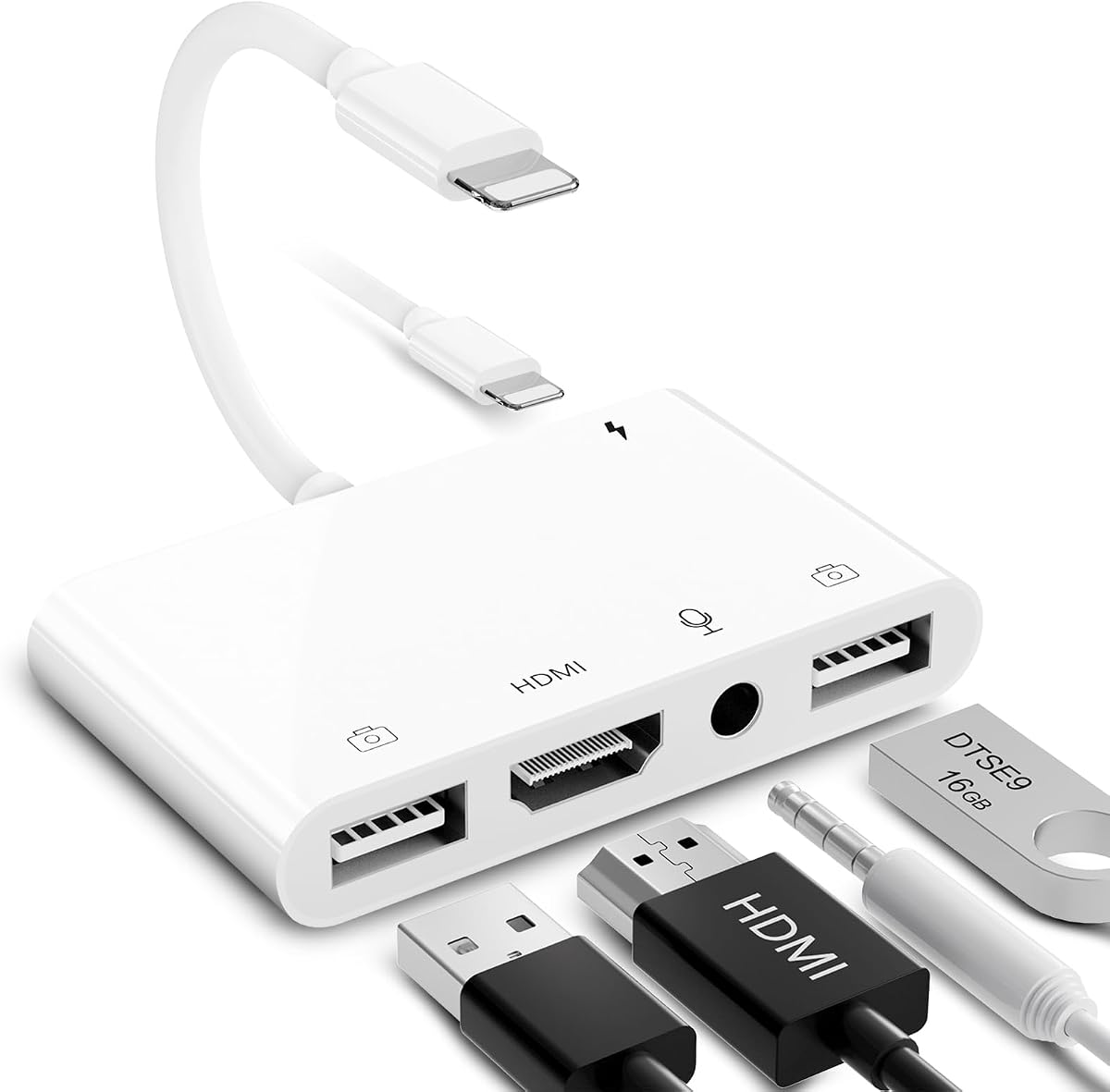
This adapter stands out for its versatility offering more than just video output. It includes multiple USB ports and a headphone jack to expand the capabilities of your iPhone significantly.
We may earn a commission when you buy through this link, at no additional cost to you.
You can connect keyboards or mice to type on your phone or transfer data from a flash drive. The microphone jack also enables live streaming or recording which is great for creators.
To use all features effectively you will need to plug in power. While it is slightly bulkier than standard adapters the extra functionality makes it a powerful tool for work.
For users who want to turn their iPhone into a mini workstation this adapter provides the necessary ports to achieve a desktop-like experience.
Connect peripherals like keyboards and mice to edit documents or browse efficiently on your phone.
The microphone port allows for live streaming directly from your device without extra hardware.
We may earn a commission when you buy through this link, at no additional cost to you.
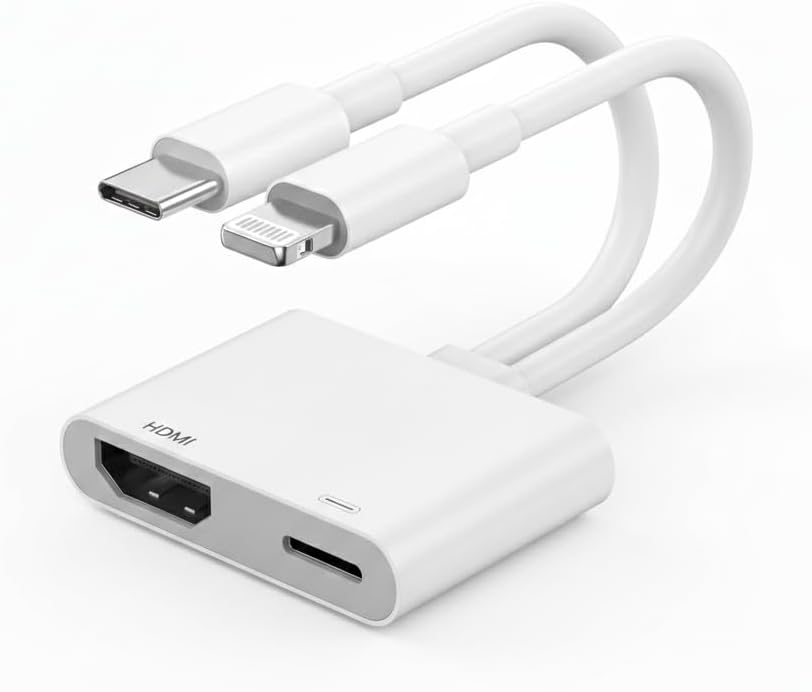
This adapter bridges the gap between older Lightning devices and modern USB-C phones. It offers high resolution support and fast charging making it a versatile tool for diverse tech needs.
We may earn a commission when you buy through this link, at no additional cost to you.
Users can connect iPhones or MacBooks to a single device. The ability to support HDCP content on USB-C mode adds a unique advantage for streaming media without restrictions.
With 100W charging capability it ensures your laptop or phone stays powered during use. The high rating reflects its robust performance and ability to handle demanding tasks well.
For those looking to future-proof their setup or use both Lightning and USB-C devices this adapter is an incredibly powerful and practical investment.
Supports 4K at 60Hz on USB-C to provide stunning visual quality for modern displays.
Works with a wide range of devices from iPhones to laptops reducing the need for multiple adapters.
We may earn a commission when you buy through this link, at no additional cost to you.
Another Apple option in the list this adapter is known for its consistent performance and high user satisfaction. It delivers solid video and audio for connecting your device to any HDMI display.
We may earn a commission when you buy through this link, at no additional cost to you.
The design focuses on simplicity and reliability ensuring that your connection remains stable during use. It supports up to 1080p HD which is sufficient for most home and office scenarios.
While it does not include a charging port the overall quality and stability make it a trusted choice for many users. It avoids common issues like signal drops or compatibility problems.
If you prefer a well-established product that just works without fuss this adapter is a dependable option for your connectivity needs.
Users rely on this adapter for its stable performance during important presentations and media playback.
Constructed to Apple standards ensuring durability and a premium feel in the hand.
We may earn a commission when you buy through this link, at no additional cost to you.
Selecting the right adapter requires careful attention to compatibility features and your specific use cases.
Look for MFi certification to ensure the adapter meets Apple standards for safety and performance. This certification prevents potential issues with device recognition or damage to your iPhone.
Always verify that the adapter supports your specific iOS version and model to avoid compatibility problems.
Choose an adapter that supports at least 1080p HD resolution for clear visuals on modern TVs. High output ensures text images and videos look sharp during presentations or streaming.
If you have 4K displays consider adapters that support higher resolutions for the best viewing experience.
Some adapters include a Lightning port for charging while others require external power. Having a charging port is useful for long presentations to keep your device powered.
Decide if you need pass-through charging or if you prefer a simpler design without extra ports.
Be aware that most adapters cannot stream protected content from services like Netflix or Hulu due to HDCP rules. Check which apps you plan to use before purchasing.
Local files and non-protected apps usually work without any restrictions on most standard adapters.
Opt for adapters with sturdy materials that can withstand frequent plugging and unplugging. A durable build ensures longer life and better performance over time.
Consider lightweight options if you plan to carry the adapter regularly in your bag or pocket.
Some adapters offer extra USB ports or headphone jacks for expanded functionality. These features are valuable if you need to connect peripherals or stream audio separately.
Evaluate if you need these extra ports or if a basic HDMI adapter meets your needs better.
Prices vary widely between budget third-party options and official Apple products. Determine a budget that balances quality and cost based on your usage patterns.
Higher prices do not always guarantee better performance but official brands often provide reliable warranty support.
Check the warranty period offered by the manufacturer for protection against defects. Good customer support can save you time if you encounter technical issues with your adapter.
Look for brands that offer responsive service and clear return policies to ensure a safe purchase.
Start by connecting the Lightning end of the adapter to your iPhone securely. Then plug an HDMI cable into the adapter's HDMI port and connect the other end to your TV or projector input.
Power on your display and select the correct input source where the HDMI cable is connected. If the adapter has a power port plug in a USB cable to charge your device or supply extra power for stability.
Clean the Lightning connector and ports regularly with a dry soft cloth to remove dust and debris. Avoid exposing the adapter to liquids or extreme temperatures to prolong its lifespan and ensure consistent performance.
Most adapters support a wide range of iPhones from older models to newer generations. However always check compatibility lists to ensure it matches your specific device and iOS version.
This is due to HDCP copyright protection policies enforced by Apple. Many apps like Netflix restrict video output on third-party adapters to prevent piracy and protect content.
Yes most adapters do not include an HDMI cable so you will need to purchase one separately. Ensure the cable length fits the distance between your device and display.
Some adapters include a Lightning charging port that allows pass-through charging. Others require external power to maintain stability but may not charge the device directly.
Yes MFi certification ensures the adapter meets safety and performance standards set by Apple. It helps prevent connection issues and potential damage to your device or accessory.
Look for at least 1080p HD resolution for clear viewing on modern screens. If you have a 4K display consider adapters that support higher resolution output for better quality.
Yes adapters transmit both video and audio signals to your display. If your TV has speakers you will get sound without needing extra audio cables.
Most Lightning adapters work with any iPad model that uses a Lightning connector. Check the product specs to confirm compatibility with your specific iPad model.
We have reviewed ten top adapters that offer different strengths for connecting your iPhone to larger displays. Whether you prioritize budget features or official branding there is a great option for every user.
Focus on what matters most to you such as charging ports resolution or app compatibility when making your decision. These details ensure the adapter meets your specific workflow needs.
Keep in mind that prices and availability can change so verify the latest specs before purchasing. Choosing the right adapter will enhance your viewing and presentation experience significantly.