
KPXOS OSU3X Custom Gaming Keyboard
3.4Editor score
Rapid trigger technology
Adjustable calibration setup
RGB backlight support
Discover the top keyboards for Geometry Dash players. This guide compares magnetic switches, rapid trigger tech, and compact layouts for precise rhythm gaming.
Finding the right keyboard for Geometry Dash can transform your gameplay experience. Precision and speed are essential for mastering difficult levels and achieving high scores in this popular rhythm platformer.
We evaluated ten top-rated keyboards based on switch technology, response times, and layout suitability. Our analysis focuses on magnetic switches, rapid trigger features, and customizable options that suit competitive players.
Each pick highlights unique strengths to help you choose wisely. Note that product availability and pricing can change frequently, so verify details on the retailer site before purchasing your ideal device.
3.4Editor score
4.7Editor score

4.5Editor score
This side-by-side comparison breaks down the key specifications and features of each keyboard to help you make an informed decision based on your specific gaming needs.





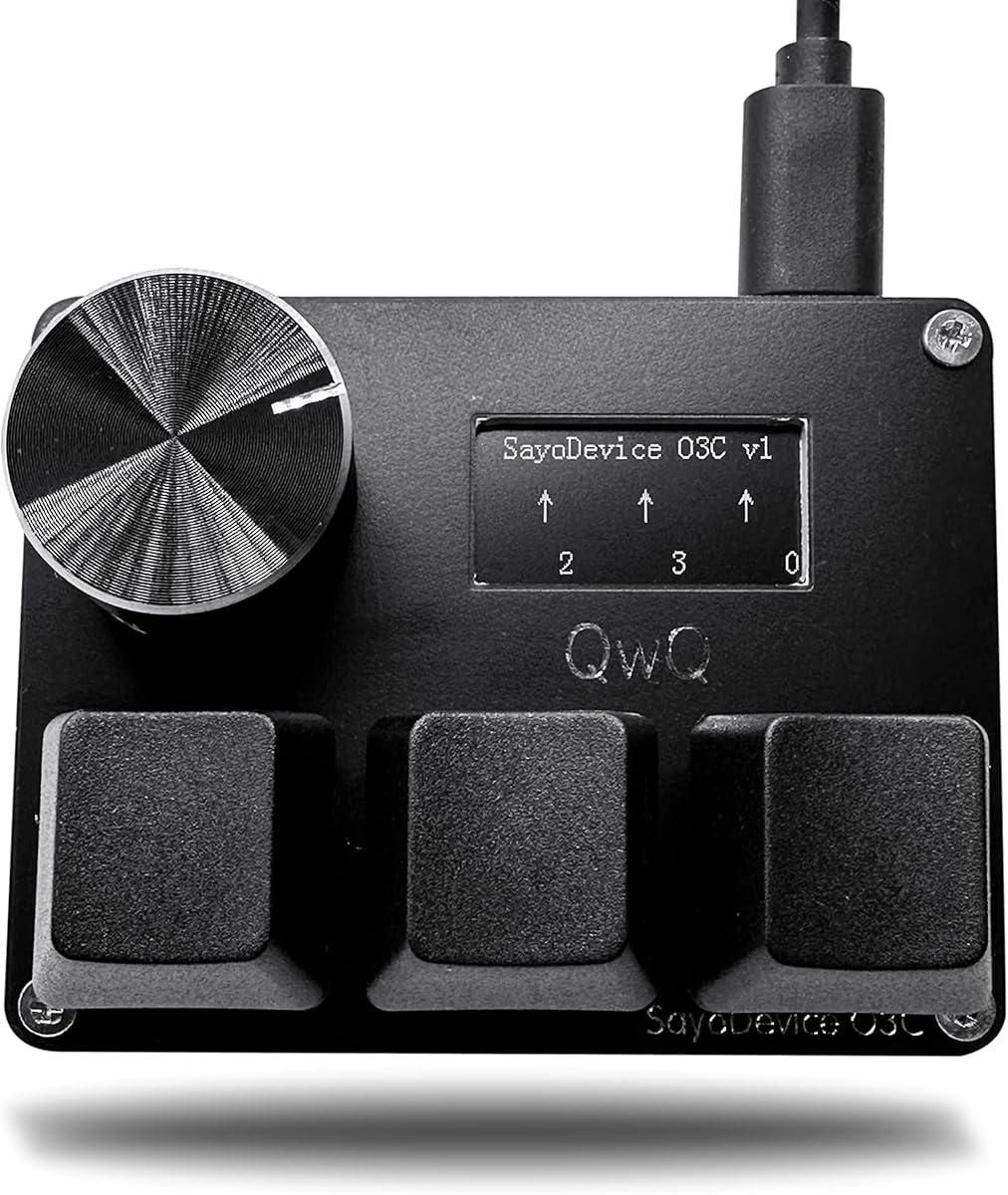
This keyboard stands out with its 3 Hall magnetic linear switches and integrated color screen. Rated at 4.7 stars, it offers rapid trigger technology ideal for fast-paced Geometry Dash levels.
We may earn a commission when you buy through this link, at no additional cost to you.
The magnetic switches provide consistent actuation without physical contact. You can adjust trigger points precisely, and the screen displays key range information for better visual feedback during play.
Calibration is sometimes needed before first use or firmware updates. This small inconvenience ensures optimal performance and is easily managed via the on-screen guidance provided.
Ideal for rhythm game enthusiasts seeking speed and precision. The combination of rapid trigger and screen feedback makes this a top choice for competitive Geometry Dash players.
The IPS screen shows key range and button counting, helping you track inputs visually.
Both the knob and screen text can be customized to suit your personal workflow needs.
We may earn a commission when you buy through this link, at no additional cost to you.
This option offers rapid trigger technology at a lower price point. With a rating of 3.4 stars, it is suitable for gamers seeking basic magnetic switch performance without premium costs.
We may earn a commission when you buy through this link, at no additional cost to you.
The adjustable trigger distance down to 0.05mm provides quick response for fast keys. Visual feedback helps you monitor key travel during gameplay sessions.
While affordable, it may lack some durability features of higher-rated models. Calibration is straightforward, and plug-and-play setup minimizes installation time.
Choose this if budget is a priority. It covers essential features for Geometry Dash but may not offer the refined feel of more expensive alternatives.
Get rapid trigger and magnetic switches without paying for premium build materials.
The IPS screen displays key travel and status to enhance user interaction.
We may earn a commission when you buy through this link, at no additional cost to you.
Another strong entry from SayoDevice featuring magnetic linear switches. The 4.7 rating reflects reliable performance for rapid trigger needs in Geometry Dash.
We may earn a commission when you buy through this link, at no additional cost to you.
The screen resolution of 160×80 shows button counting clearly. You can customize the first line of text with your ID or other personal details.
Like other models in this series, calibration may be needed initially. This ensures switch precision and is a minor step for improved gameplay accuracy.
Best for players wanting a compact keypad with visual feedback. The hotswap feature allows switch experimentation without soldering for a personalized experience.
Write your own ID on the screen to add a personal touch to your setup.
8000Hz polling rate ensures minimal input lag during intense gaming sessions.
We may earn a commission when you buy through this link, at no additional cost to you.
This keyboard supports professional magnetic switches with custom trigger release settings. A 4.6 rating indicates solid performance for Geometry Dash players needing speed.
We may earn a commission when you buy through this link, at no additional cost to you.
The screen supports custom animations and shows visible key range details. Knob and key customization allow control over actions like scrolling song lists.
You can adjust the trigger release from 0 to 4.000mm for fine control. Calibration steps are shown clearly in the product figures for easy setup.
Choose this for advanced magnetic switch customization. It balances performance and visual feedback well for rhythm game enthusiasts.
Adjust trigger release precisely to match your specific gameplay style.
Add custom animations to the screen for a more interactive display.
We may earn a commission when you buy through this link, at no additional cost to you.
This 60% keyboard delivers rapid trigger with a 0.02mm RT step distance. The 4.5 rating confirms reliability for fast-paced games and typing.
We may earn a commission when you buy through this link, at no additional cost to you.
The web-based driver allows easy customization without software downloads. Magnetic switches eliminate wear and tear for consistent actuation performance.
While compact, it retains essential keys for gaming. The space-saving layout is ideal for gamers who prioritize mouse movement space.
Best for gamers wanting a premium compact experience. The driver ease and magnetic tech make it versatile for Geometry Dash and other competitive titles.
Remap keys and create macros via any browser-connected device without installation.
Save desk space with a 60% layout that fits tight gaming setups.
We may earn a commission when you buy through this link, at no additional cost to you.
This keyboard offers wireless connectivity alongside a TFT screen and rotary knob. A 4.2 rating suggests good general performance for typing and light gaming.
We may earn a commission when you buy through this link, at no additional cost to you.
Triple Mode allows switching between Bluetooth, 2.4G wireless, and wired. Gasket design provides shock absorption for a smoother typing experience.
The side-printed PBT keycaps resist wear well. Customization via driver supports deep function mapping and RGB effects.
Ideal for users wanting wireless freedom and visual feedback. While not magnetic switch, it offers strong customization for Geometry Dash workflows.
Switch between devices easily with triple mode connectivity options.
Five-layer shock absorption reduces vibration during intense typing.
We may earn a commission when you buy through this link, at no additional cost to you.
This keyboard supports 0.01mm adjustable actuation with DKS and SOCD. The 4.7 rating reflects high precision and performance for competitive gamers.
We may earn a commission when you buy through this link, at no additional cost to you.
8000Hz polling rate ensures fast input transmission. Hot-swappable 3-pin magnetic switches allow easy replacement or upgrade.
Web-based driver customization simplifies settings management. Shock-absorbing gasket structure dampens vibrations for quieter keystrokes.
Best for competitive players needing fine-tuned controls. The feature set is robust for Geometry Dash and FPS gaming needs.
Unlock SOCD and DKS for precise simultaneous input handling.
Gasket structure reduces hollow echoes for a refined acoustic sound.
We may earn a commission when you buy through this link, at no additional cost to you.
This keyboard features a professional web driver for easy customization. A 4.5 rating indicates reliable performance for Geometry Dash and general gaming.
We may earn a commission when you buy through this link, at no additional cost to you.
Trigger sensitivity and actuation can be set via software. 8000Hz polling rate ensures commands take effect instantly.
While Mac users are excluded from driver support, Windows users get full control. 60% layout saves desktop space effectively.
Ideal for Windows gamers valuing driver ease. The fast trigger and compact form factor support competitive play well.
Manage all settings via browser without downloading bulky software packages.
8x faster response time than traditional mechanical keyboards.
We may earn a commission when you buy through this link, at no additional cost to you.
The white version of the OSU3X offers similar magnetic switch features. A 3.0 rating suggests potential inconsistencies or basic build expectations.
We may earn a commission when you buy through this link, at no additional cost to you.
It includes an IPS screen for key travel visualization. Trigger distance calibration supports independent adjustments per key.
Setup is plug-and-play with Type-C interface. Suitable for basic rhythm game needs without advanced customization.
Choose if color preference is primary. It covers essential rapid trigger features for Geometry Dash at a standard level.
Real-time status and key counting display on the home screen.
White variant offers a clean look for minimalist desk setups.
We may earn a commission when you buy through this link, at no additional cost to you.
This keypad supports magnetic calibration with a shortest trigger of 0.05mm. A 3.1 rating indicates basic performance for rhythm games.
We may earn a commission when you buy through this link, at no additional cost to you.
The screen allows customization of boot interface text. Knob can set keys like scrolling song lists for convenience.
USB 2.0 high-speed polling ensures responsive input. Keystroke recording supports multi-language functionality for broad use.
Ideal for fans of simple magnetic keypads. It provides essential rapid trigger features without complex software needs.
Record and replay keystrokes for macro-like automation.
Support for multiple languages broadens usability for international players.
We may earn a commission when you buy through this link, at no additional cost to you.
Selecting a keyboard for Geometry Dash requires attention to switch type, response speed, and layout compatibility.
Magnetic switches use Hall Effect sensors for consistent actuation without physical contact. This eliminates wear and ensures uniform key travel which is vital for precise inputs in rhythm games.
Prioritize magnetic or Hall Effect switches over mechanical ones for faster durability and adjustability.
Rapid trigger instantly resets the key based on movement rather than a fixed point. This allows ultra-fast key presses and releases that match rapid movement in Geometry Dash levels.
Look for keyboards explicitly supporting rapid trigger mode for competitive gameplay.
High polling rates like 8000Hz reduce latency by sending data more frequently. Lower input lag ensures your commands register instantly during high-speed sections.
Choose keyboards with at least 1000Hz polling and higher for better responsiveness.
Adjustable actuation allows you to set how far a key must travel before registering. A lower range like 0.02mm enables quicker inputs but may increase accidental presses.
Test different settings to find the balance that matches your typing style.
Compact 60% layouts save desk space allowing more room for mouse movement. Some models retain arrow keys which may help with navigation in game menus.
Ensure the layout suits your hand size and comfort during long sessions.
Driver software lets you customize key mapping and macros. Web-based drivers avoid installation and simplify adjustments across devices.
Verify driver compatibility with your operating system before buying.
Visual feedback via screens or RGB lights helps confirm inputs during gameplay. Key counters or status displays enhance awareness of your current input state.
These features are optional but helpful for improving consistency.
Solid construction ensures longevity despite rapid repeated inputs. Materials like PBT keycaps resist shine and wear better than ABS over time.
Invest in models with good durability ratings for long-term use.
Start by installing any required drivers via the manufacturer website or web portal. Follow calibration steps shown in the user guide before first use.
Keep the keyboard clean by regularly wiping keys with a soft cloth. Avoid liquids near the switches to prevent internal damage.
Store in a dry environment away from direct sunlight to preserve electronics. Periodically check cable connections if using wired models for stability.
A good keyboard for Geometry Dash features rapid trigger technology, magnetic switches, and adjustable actuation. These ensure fast response times and precise control necessary for navigating difficult sections.
Keypads offer compact layouts ideal for quick inputs but lack extra keys. Full keyboards provide versatility if you use additional game functions beyond basic movement.
Rapid trigger greatly improves speed and responsiveness which helps in high-level play. While not strictly necessary, it provides a significant advantage in competitive rhythm games.
Some models support Mac via plug-and-play but driver software may be Windows-only. Verify driver compatibility before purchase to ensure full functionality.
Calibration is typically needed before first use or after firmware updates. Regular use may require occasional recalibration if response accuracy changes.
Many models offer RGB lighting with customizable colors and effects. Check product specs if lighting customization is important for your setup.
The BTXETUEL SayoDevice O3C leads with excellent rapid trigger and visual feedback features ideal for rhythm gaming. Budget buyers may prefer KPXOS OSU3X for affordability and basic magnetic performance.
Prioritize rapid trigger support, high polling rates, and comfortable layout when deciding. These factors directly impact your ability to execute precise inputs during intense gameplay.
Always verify current availability and pricing on the retailer site as details can change. Select the keyboard that matches your budget and performance needs best.