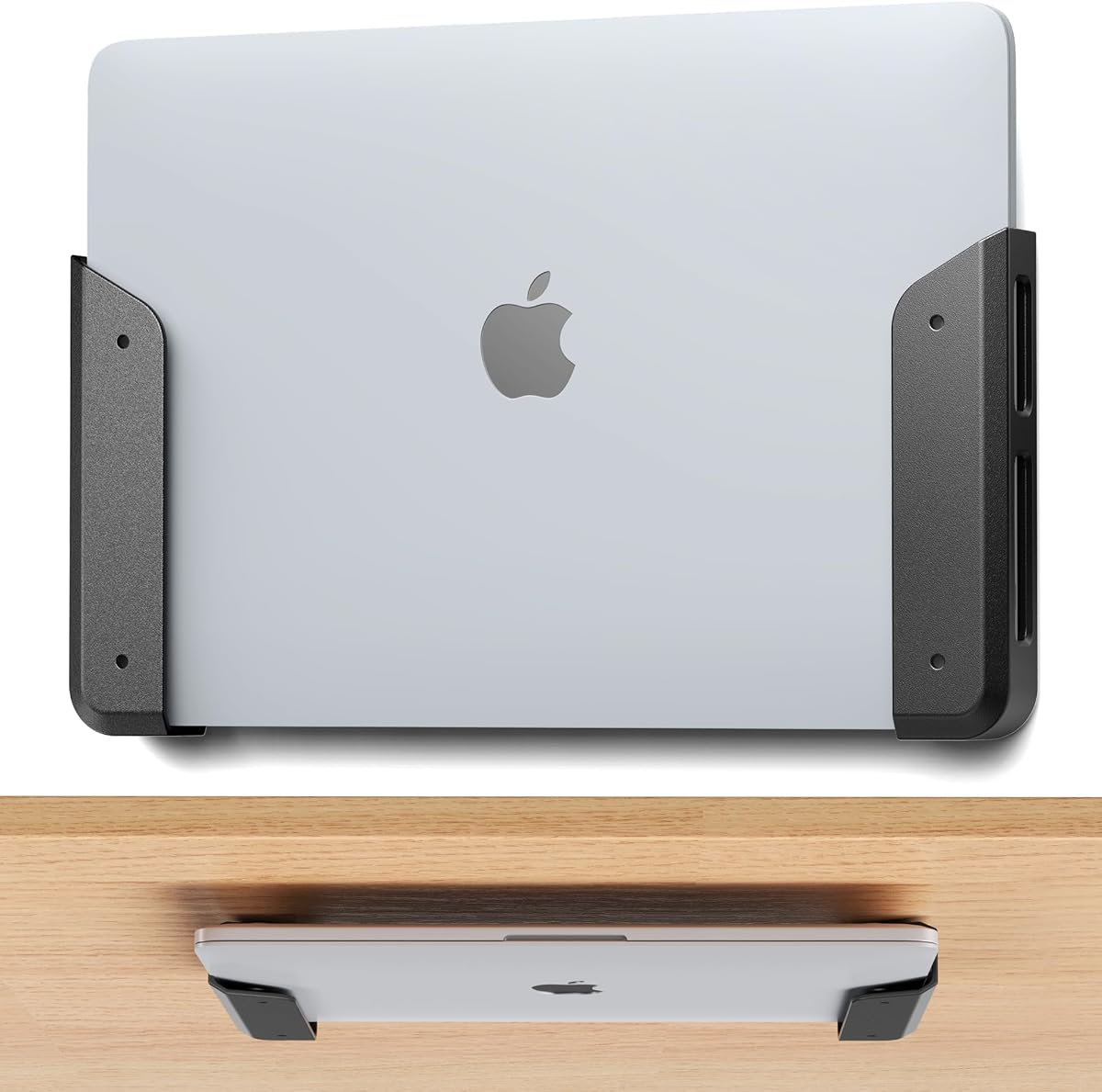
ELETIUO Wall & Under Desk Laptop Mount
4.2Editor score
Dual mounting options
Anti-scratch pads included
Fits thick devices
This comprehensive guide compares the top 10 laptop wall mounts for 2026, evaluating features, compatibility, and ergonomic benefits to help you choose the
Transform your workspace with a laptop wall mount that elevates your device for better ergonomics and frees up valuable desk space for a cleaner, more efficient setup.
We analyzed ten leading models based on build quality, adjustability, and compatibility to bring you a curated list of the most reliable options available on the market today.
Each pick highlights key strengths and ideal use cases, ensuring you find the right fit for your needs, though please note that prices and availability may change over time.
4.2Editor score

4.6Editor score

4.5Editor score
Explore the side-by-side comparison of the top 10 laptop wall mounts to quickly identify which model offers the best value, features, and stability for your specific environment.


The MOUNT PRO Laptop Wall Mount stands out as our top choice for its exceptional versatility and robust build quality that supports a wide range of devices securely.
We may earn a commission when you buy through this link, at no additional cost to you.
Its dual functionality allows you to mount a laptop or a monitor with ease, featuring smooth articulating arms that tilt, swivel, and rotate to provide optimal viewing angles for any task.
While it offers excellent value, users should note that it is best mounted on a solid surface like a wood stud to ensure maximum stability when supporting heavier devices.
If you want a single solution that adapts to both home office and professional settings while freeing up desk space, this mount is the ideal investment for your workspace.
This mount seamlessly switches between laptop holding and monitor mounting with a VESA plate, giving you flexibility for different devices without needing multiple installations.
The ventilated tray features slots that promote airflow to keep your laptop cool during extended work sessions, preventing overheating and maintaining device performance.
We may earn a commission when you buy through this link, at no additional cost to you.
The ELETIUO Wall & Under Desk Laptop Mount offers an affordable and flexible solution for securing smaller devices with easy installation options that suit different needs.
We may earn a commission when you buy through this link, at no additional cost to you.
It supports a wide variety of gadgets from MacBooks to Switch consoles and provides a secure hold with anti-scratch pads to protect your equipment during daily use.
While the adhesive option is convenient for renters or temporary setups, heavier laptops should use the screw mount for long-term stability and safety.
For those seeking a cost-effective way to declutter their desk without compromising on device protection, this universal mount delivers solid performance and value.
Choose between strong adhesive strips for quick mounting or heavy-duty screws for permanent installation, allowing you to adapt the mount to your specific situation.
The cut-out design ensures that all ports and buttons remain fully accessible so you can charge and connect peripherals without removing the device.
We may earn a commission when you buy through this link, at no additional cost to you.
The Long Arm 2-in-1 Laptop Wall Mount delivers premium performance with an extended reach and gas spring system that provides unmatched stability and ergonomic adjustability.
We may earn a commission when you buy through this link, at no additional cost to you.
Its 3-section arm allows you to position your laptop anywhere from 3.54 inches to nearly 28 inches away, making it perfect for tight or specialized workspaces.
Although the price reflects its advanced features, the ability to remove the tray and switch to VESA monitor mounting offers significant long-term versatility and utility.
Invest in this model if you need a highly adjustable, durable mount that supports heavy use and can transform into a full monitor arm as your needs evolve.
With a maximum reach of 27.83 inches, this mount allows you to pull your laptop closer for detailed work or push it away for a broader view.
The durable gas spring system ensures your device stays exactly where you set it without drifting, offering smooth movement and secure positioning for all tasks.
We may earn a commission when you buy through this link, at no additional cost to you.
This Laptop Wall Mount combines a robust build with a versatile design that supports up to 22 pounds, making it suitable for heavier laptops and monitors alike.
We may earn a commission when you buy through this link, at no additional cost to you.
The open-frame design and locking clamps ensure your device is safe from falls while providing ample airflow to prevent overheating during long work sessions.
Users should be prepared to mount this unit on a solid wall surface to ensure it handles the full weight capacity safely and securely.
If you prioritize weight capacity and space-saving features without breaking the bank, this is a strong contender that delivers reliable performance for home and office use.
Dual adjustable clamps and an innovative locking mechanism keep your laptop firmly in place, reducing the risk of accidental slips or drops during use.
By lifting your device off the desk, this mount frees up to 80 percent of your workspace, allowing for a cleaner and more organized environment.
We may earn a commission when you buy through this link, at no additional cost to you.
The MOUNTUP Laptop Wall Mount offers a smart locking latch and extended reach to provide a secure and flexible mounting experience for laptops and monitors up to 32 inches.
We may earn a commission when you buy through this link, at no additional cost to you.
Its compact design and VESA compatibility make it an ideal choice for small dorms and offices where space is at a premium.
While the cable management is basic, the overall stability and ease of setup make it a reliable choice for most users.
Choose this model if you need a balance of size, security, and monitor compatibility without compromising on build quality or ease of use.
The clever latch locks your laptop in place to prevent slips during typing or gaming, ensuring your device stays secure in any position.
With full motion adjustments, you can easily switch between typing and viewing angles to reduce strain and improve comfort throughout your workday.
We may earn a commission when you buy through this link, at no additional cost to you.
The WALI Laptop Wall Mount provides a dynamic and ergonomic solution that accommodates a wide range of devices from laptops to large monitors with ease.
We may earn a commission when you buy through this link, at no additional cost to you.
Its ventilated cooling platform helps keep devices running cool during intensive tasks like gaming or video editing while reducing neck and eye strain.
While it does not offer an adhesive option, the screw mount ensures a secure and stable installation that lasts for years of daily use.
If you want a versatile arm that supports heavy loads and keeps your device cool, this mount offers excellent performance for professional and gaming setups.
The adjustable arm lets you switch between typing, viewing, and conferencing modes to maintain healthy posture during long work or study sessions.
Built-in ventilation holes on the platform dissipate heat efficiently, ensuring your laptop runs smoothly without overheating under heavy workloads.
We may earn a commission when you buy through this link, at no additional cost to you.
This 2-in-1 Laptop Wall Mount features an adjustable platform width and concealed cable management to ensure a clean and secure setup for your devices.
We may earn a commission when you buy through this link, at no additional cost to you.
The anti-scratch pads and ventilation slots provide protection and cooling, while the full range of motion helps you find the perfect viewing angle.
Some users may find the assembly slightly complex, but once installed, the mount offers reliable stability and smooth adjustments.
For those who value adjustable fit and cable organization, this model is a great choice that keeps your workspace tidy and your device safe.
The concealed cable management system hides cords neatly on the arm, creating an aesthetically pleasing and uncluttered office environment.
Adjust the platform width to fit different device sizes securely, ensuring your laptop or monitor is held firmly without slipping during use.
We may earn a commission when you buy through this link, at no additional cost to you.
The VIVO Black Laptop Wall Mount uses a pneumatic arm for smooth, tool-less height adjustments that make it easy to set your laptop at the perfect ergonomic level.
We may earn a commission when you buy through this link, at no additional cost to you.
Its rubber tabs protect your device from scratches while the ventilation slots ensure your laptop stays cool during intensive tasks.
Note that the arm requires a minimum weight to function properly, so ensure your laptop meets the specifications before purchase.
If you prefer a mount that offers effortless adjustments and includes a solid warranty, this VIVO model delivers reliable performance for mid-size laptops.
Adjust the height of your laptop instantly without tools, allowing you to switch between sitting and standing positions with ease.
Backed by a 3 Year Manufacturer Warranty, this mount offers peace of mind and long-term reliability for your daily computing needs.
We may earn a commission when you buy through this link, at no additional cost to you.
The Mount-It! Ergonomic Laptop Arm stands out for its unique ability to mount on a wall or a round pole, offering flexibility for unique spaces like clinics or studios.
We may earn a commission when you buy through this link, at no additional cost to you.
Its spring arm keeps your device firmly in place without sagging and allows you to adjust tension to match your preferences.
While you need to buy a pole separately, the mount itself includes all necessary hardware for standard wall installation and offers great versatility.
If you need a mount for unconventional setups or want a strong arm that holds your laptop firmly, this model provides reliable support and adaptability.
Mount on a wall or a round pole to reclaim space under your desk or counter, making this ideal for clinics, workshops, or RVs.
The spring arm keeps your laptop planted where you set it, preventing drooping and ensuring stable positioning throughout your workday.
We may earn a commission when you buy through this link, at no additional cost to you.
This Universal Wall Mount offers a two-tier shelf design that can hold a laptop and keyboard or multiple smaller devices, providing a practical storage solution.
We may earn a commission when you buy through this link, at no additional cost to you.
Made from high-quality metal with EVA pads, it secures devices safely and supports up to 22 pounds of weight without issues.
Unlike adjustable arms, this mount is fixed in place, which may not suit everyone, but it is excellent for dedicated docking stations.
If you want a sturdy, space-saving rack to store multiple electronics neatly on your wall, this mount delivers robust protection and organization.
Use the two-tier design to store a laptop and keyboard together or hold multiple tablets and routers for a compact, organized setup.
EVA pads on the mount protect your devices from scratches, while the metal construction ensures long-term stability for heavy electronics.
We may earn a commission when you buy through this link, at no additional cost to you.
Choosing the right laptop wall mount depends on several key factors that ensure stability, compatibility, and ergonomic comfort for your specific workspace.
Ensure the mount supports your device size and weight range to prevent accidents and guarantee secure attachment.
Look for models with adjustable platforms or trays that fit various dimensions from small tablets to large 17-inch laptops.
Decide between wall, under-desk, or pole mounting based on your available space and installation preferences.
Wall mounts offer the most stability, while under-desk options save wall space and pole mounts add unique flexibility.
Full-motion mounts that tilt, swivel, and extend provide the best ergonomic benefits by allowing you to position your screen at eye level.
Consider how much reach you need for tasks like cooking or working at different heights in your room.
Choose sturdy materials like steel or aluminum for long-lasting support that won't sag over time under load.
Check for padded surfaces or EVA pads to protect your device from scratches and improve grip stability.
Ventilated trays or platforms help dissipate heat from your laptop during heavy usage to maintain performance and prevent overheating.
Open-frame designs are particularly beneficial if you use your device for gaming or video editing frequently.
Verify if the mount requires studs, concrete, or drywall anchors to ensure your chosen wall can handle the weight safely.
Check if the product includes necessary hardware or if you need to purchase additional screws or adapters separately.
Integrated cable channels or management systems keep wires organized and visible for a clean and professional look.
Hidden cable routing is ideal for shared spaces where appearance matters and clutter needs to be minimized.
A solid warranty and responsive customer support can save you time and money if issues arise during setup or use.
Look for manufacturers that offer clear instructions and accessible help lines for troubleshooting.
Install your mount on a solid surface like a wood stud or concrete wall using the provided hardware to ensure it can support the weight of your device safely.
Adjust the arm angle and position so your screen is at eye level to reduce strain on your neck and back during long work or study sessions.
Regularly check the screws and tension bolts to keep the mount stable and prevent sagging over time by tightening any loose parts promptly.
Yes, most laptop wall mounts are compatible with MacBooks. Check the weight and dimensions of your specific MacBook model to ensure it falls within the supported range listed by the manufacturer.
Not all mounts fit every size, so you must verify the dimensions and weight limits. Many models support laptops from 11 to 17 inches, but always confirm compatibility before buying.
Most mounts come with clear instructions and hardware, making installation manageable for beginners. However, mounting on concrete or studs may require special drills or tools.
Mounting on drywall alone is not recommended for heavy loads. If you must, use high-strength anchors or find a stud behind the drywall to ensure stability and safety.
Many modern laptop wall mounts include a VESA adapter that allows you to convert them into monitor mounts. Check if the product includes this feature for added flexibility.
Look for mounts with ventilated trays or open designs that allow airflow around your laptop. Proper ventilation prevents overheating during long periods of use.
Our top picks like the MOUNT PRO Laptop Wall Mount and the ELETIUO Mount offer the best balance of performance, affordability, and features for most users.
Prioritize models with strong build quality and full adjustability to ensure your mount meets your ergonomic needs and supports your devices safely.
Remember to verify current prices and availability as they may change, so act quickly once you find the right model for your setup.